Taskzin vs Smartsheet: Spreadsheet Power vs Modern PM
An honest comparison of Taskzin and Smartsheet, covering the difference between a grid-first and a work-first model, where Smartsheet's formulas and data handling win, where Taskzin's collaboration and flow management win, and migration realities.

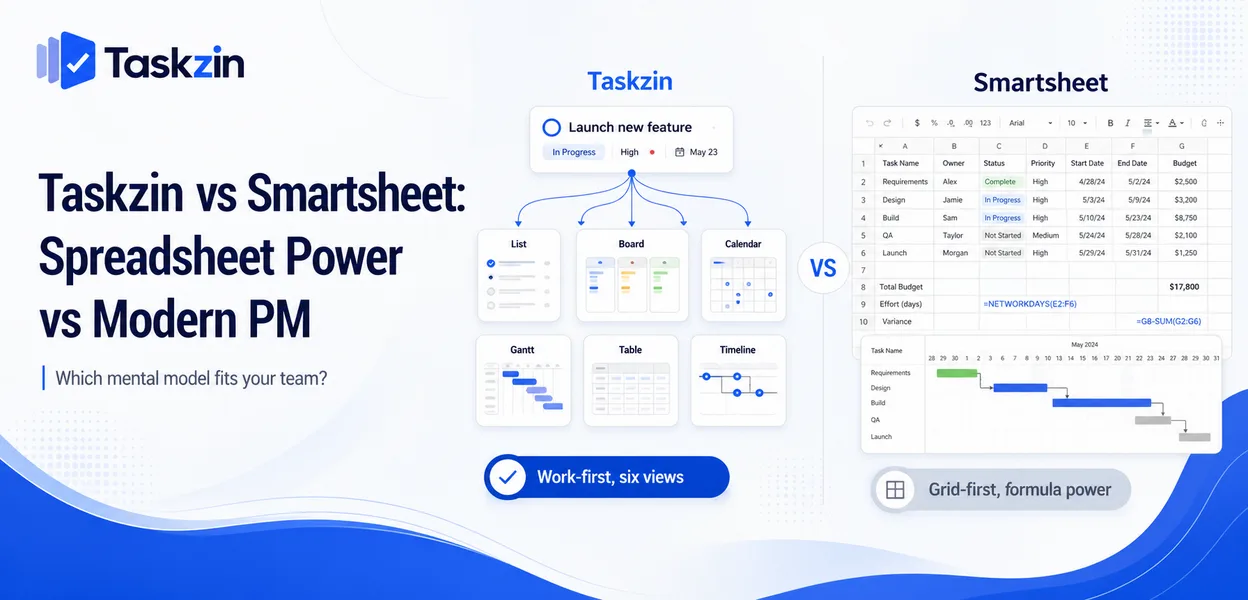
Teams that think in rows and formulas find Smartsheet natural. Teams that think in tasks and boards find it awkward. Neither reaction is wrong, and it predicts adoption better than any feature comparison.
Quick answer: Smartsheet is a spreadsheet-shaped platform with project features layered on — rows, columns, formulas and cell logic, with Gantt and card views available. Taskzin is a project tool with six views over one dataset, including a Table view for people who prefer a grid.
The choice is largely about which mental model your team already has.
The Core Difference
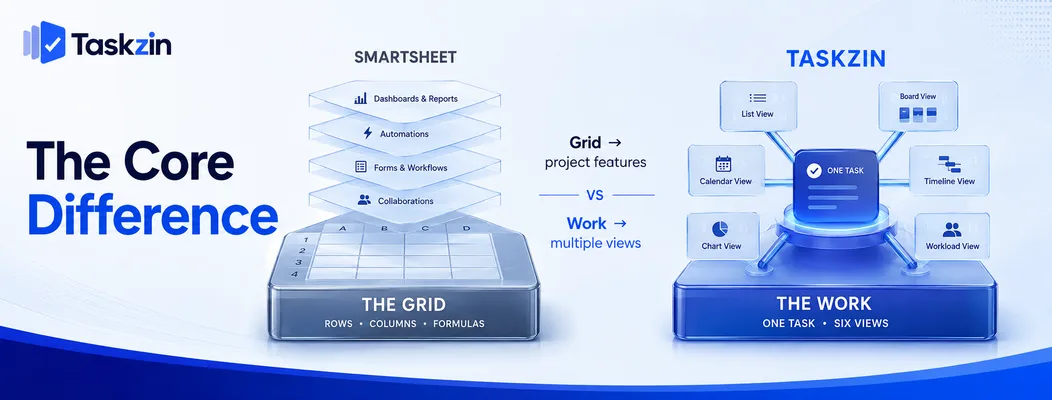
Smartsheet starts from the grid and adds project capability; Taskzin starts from the work and offers a grid as one of six views.
A grid with project features versus views over work
In Smartsheet, the sheet is the object. Rows are the unit, formulas operate across cells, and project features — dependencies, Gantt, resource views — are built on that foundation.
In Taskzin, the task is the object. List, Board, Calendar, Gantt, Table and Timeline are six ways of looking at the same underlying work, so switching view does not mean switching structure.
Who each mental model suits
Smartsheet suits people who reach for a spreadsheet first: operations, planning, finance-adjacent teams, construction schedulers, anyone whose existing process is already a sheet.
Taskzin suits teams whose work is a stream of tasks with owners and stages, and who want board and flow management alongside a timeline.
Why this decides the choice
Feature lists overlap substantially. What differs is which model feels natural, and that determines whether people actually update the record.
A team forced into a mental model they do not share will maintain a shadow system, which is the failure that matters more than any missing feature.
Taskzin vs Smartsheet at a Glance
Smartsheet to Taskzin
Core object Task Row in a sheet Views List, Board, Calendar, Gantt, Table, Timeline Grid, Gantt, Card, Calendar
Formulas and cell-level logic
Dependencies Yes Yes Critical path Yes, recalculates Yes WIP limits and swimlanes Yes No Sprints, velocity, burndown Starter and above Limited Docs linked to tasks Yes Attachments Free plan Yes, up to 10 members Limited Pricing model Flat per member, no seat tiers Per user, tiered Guests Free, unlimited, view and comment Varies by plan Automations All plans Higher tiers Dashboards 30+ widgets on Business Strong Data export JSON or CSV, any plan Available Best for Task and flow-driven teams Sheet-driven, data-heavy planning
Verify current Smartsheet pricing before relying on cost comparisons.
Where Smartsheet Is Stronger
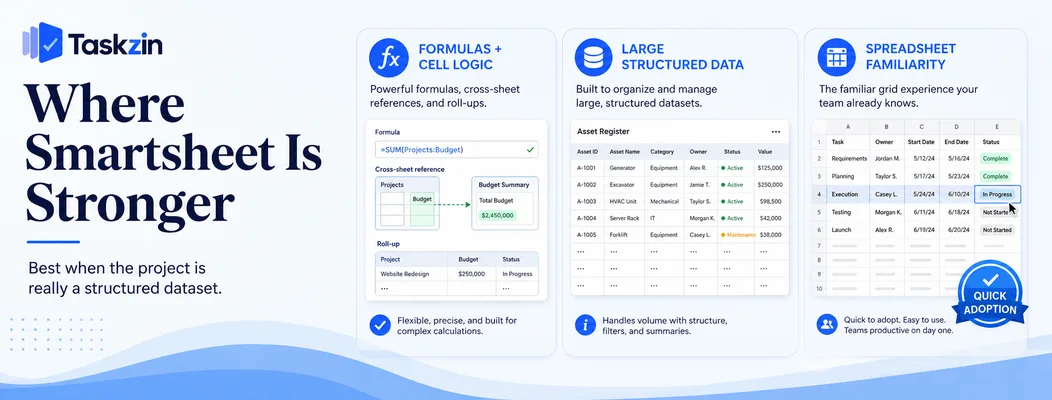
Smartsheet wins on formulas and cell-level logic, on handling large structured datasets, and on familiarity for teams already living in spreadsheets.
Formulas and cell-level logic This is Smartsheet's clearest advantage. Cross-sheet references, conditional formulas, calculated columns and roll-ups let you build genuine logic into the sheet.
Taskzin has custom fields but does not offer a formula engine. If your project tracking involves calculations — cost roll-ups, weighted scoring, derived dates — Smartsheet does this natively and Taskzin does not.
Large structured datasets
Smartsheet handles large volumes of structured rows well, which suits inventories, asset registers, programme trackers and anything closer to a database than a task list.
Where your "project" is really a few thousand records with status, Smartsheet is the better shape.
Familiarity for spreadsheet teams
A team that already runs its work in Excel adopts Smartsheet with almost no learning curve, because the interaction model is one they know.
This is a genuine and underrated advantage. Adoption failure is more common than capability failure, and familiarity reduces that risk substantially.
Where Taskzin Is Stronger
Taskzin wins on collaborating around the work itself, on board and flow management, and on pricing that does not rise with guests.
Collaboration on the work itself
Comment threads attached to individual tasks, docs linked to the work, and notifications tied to what changed.
A spreadsheet row holds data well and discussion poorly. When the conversation about a piece of work lives elsewhere — email, chat — the context is lost, which is the recurring cost of managing projects in a sheet.
Board and flow management
Taskzin's board supports WIP limits and swimlanes, with sprints, velocity and burndown on Starter and above.
Smartsheet has a card view; it does not attempt flow management. For teams practising Kanban or running sprints, this is a genuine capability difference rather than a presentational one.
Pricing and guest access
Taskzin charges flat per member with no seat tiers — Free up to 10, $7 Starter, $14 Business — and includes free unlimited guests with view and comment access.
For teams sharing project visibility with clients or stakeholders, that guest policy is usually the largest practical cost difference. Check Smartsheet's current terms against your real collaborator count.
The Adoption Question

Spreadsheet familiarity helps adoption and can also preserve bad habits; what matters is who updates the record and what happens as it grows.
Spreadsheet familiarity cuts both ways
Familiarity gets people started quickly. It also lets a team continue treating project tracking as data entry rather than as coordination, which is frequently the habit they were trying to leave.
If your team's problem is that the spreadsheet is always out of date, moving to a spreadsheet-shaped tool may not change the behaviour.
Who actually updates the record
In a sheet, updating usually falls to one person maintaining it. In a task tool, ownership sits with the person doing the work and updating is a single action.
That difference determines data accuracy. A sheet maintained by one coordinator is a status document; a board updated by the people doing the work is a live record.
What happens as the sheet grows
Sheets degrade in a specific way — more columns, more tabs, cross-references that break, and eventually a structure only its author understands.
Task tools degrade differently, through unused fields and stale items, but the core record stays legible. Which failure mode you prefer is a reasonable way to decide.
Migrating Between Them
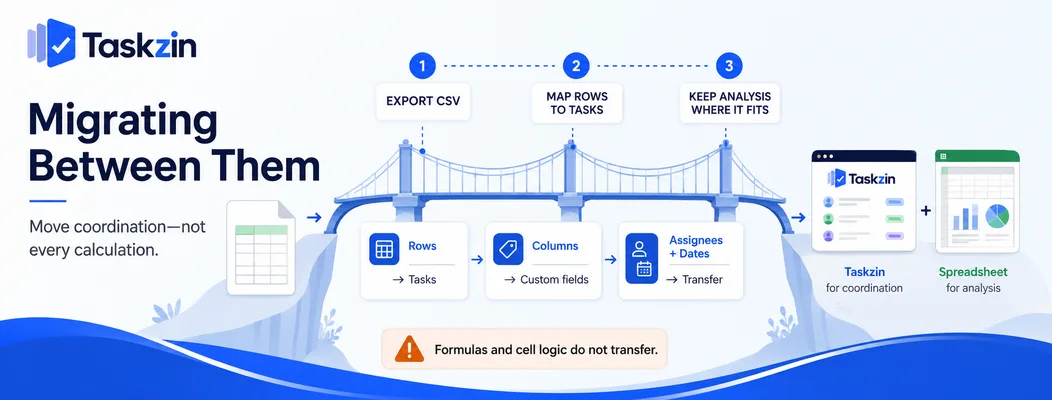
Moving from Smartsheet is a CSV exercise, some things do not transfer, and keeping analysis in a spreadsheet alongside is a legitimate outcome.
Smartsheet to Taskzin Taskzin's one-click importer covers ClickUp, Jira, Asana and Trello — not Smartsheet — so this is a CSV import.
Rows map to tasks, columns to custom fields, and assignees and dates transfer. Export from Smartsheet while your account is active and check the file before cancelling.
What does not transfer
Formulas, cross-sheet references and conditional formatting have no destination in a task tool.
Neither does anything that depended on cell-level logic.
If a meaningful part of your process is calculation rather than coordination, that is a signal to keep it in a spreadsheet rather than to force it into a project tool.
Keeping the analysis in a spreadsheet
A common and sensible outcome: coordination in the project tool, analysis in a spreadsheet, exported when needed.
Taskzin exports fully to JSON or CSV on any plan, so the analysis workflow continues while the day-to-day coordination gets a better home.
Frequently asked
Is Smartsheet a spreadsheet or a project tool?
Both — it is a spreadsheet-shaped platform with project capabilities including dependencies, Gantt and card views built on top of a grid and formula engine.
Which is better, Taskzin or Smartsheet?
Smartsheet is better where calculation and large structured datasets matter. Taskzin is better for task-driven collaboration, board and flow management, and teams who do not think in rows.
Which is cheaper?
Taskzin charges flat per member with no seat tiers, is free up to 10 members, and includes free unlimited guests. Compare against Smartsheet's current per-user pricing at the tier containing the features you need.
Does Taskzin have formulas?
No. Taskzin has custom fields but not a formula engine. If derived values and cross-sheet calculation are central to your process, that is Smartsheet's clearest advantage.
Can you import Smartsheet data into Taskzin?
Via CSV rather than the one-click importer, which covers ClickUp, Jira, Asana and Trello. Rows map to tasks and columns to custom fields; formulas do not transfer.
Which is easier for non-technical teams?
It depends on their existing habit. Teams that already live in spreadsheets adopt Smartsheet faster; teams that think in tasks and boards find Taskzin more natural.
Which handles large projects better?
Smartsheet handles large volumes of structured rows better. Taskzin handles many concurrent projects and cross-project views better. The right answer depends on whether your scale is rows or projects.
Sujan Sharma is a content writer at Taskzin with a strong focus on productivity systems, task management, workflow optimization, team collaboration, and SaaS technology. He creates research-driven, practical content that helps professionals and growing teams improve operational efficiency, streamline processes, and make informed decisions about modern work management tools.
All posts by Sujan Sharma
Comments