What Are WIP Limits and Why Do They Matter?
A plain-English explanation of WIP limits, covering what they are, why constraining concurrent work reduces cycle time, how to set and adjust the number, examples by team type, what to do when you hit the limit, and common mistakes.


WIP limits are the least popular idea in workflow management and the one that most reliably produces results. The objection is always the same: how can doing fewer things at once make us faster?
The answer is arithmetic rather than opinion, and it is worth understanding properly because the instinct to start more work is strong and consistently wrong.
This guide explains what a WIP limit is, why constraining work speeds delivery, how to set one, and what to do when you hit it.
Quick answer: Quick answer: A WIP limit is a cap on how many items a team or a workflow stage may have in progress at once. When the limit is reached, nobody starts anything new until something finishes. Limiting concurrent work reduces the time each item takes to complete, because less time is lost to switching between tasks and queues stop building up invisibly.
Why Limiting Work Speeds Things Up
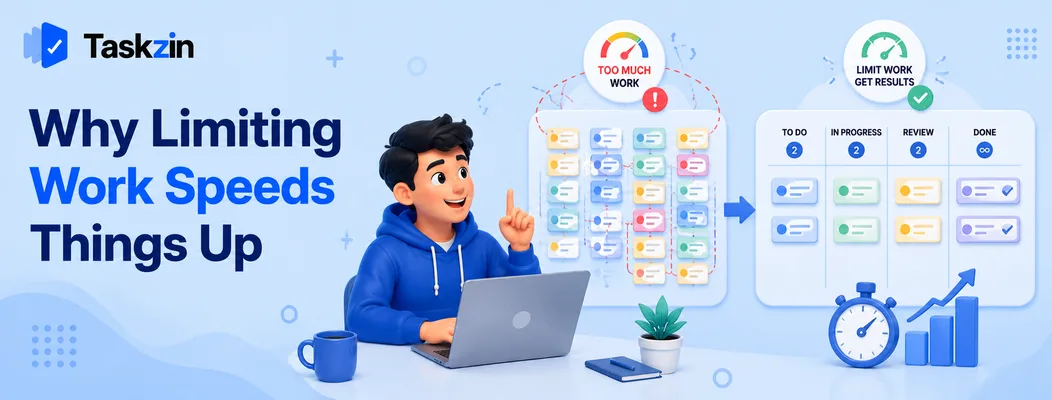
Fewer concurrent items means each one finishes sooner, because cycle time is proportional to how much work is in progress, and because switching between tasks carries a real cost.
Little's Law in plain terms
Little's Law states that average cycle time equals work in progress divided by throughput. Put simply: if you have twice as many things on the go and complete them at the same rate, each one takes twice as long.
The team's output does not increase because they started more items. The items simply sit unfinished for longer, which is why a team can feel extremely busy while delivering nothing this week.
The cost of switching between tasks
Every switch between pieces of work carries a reload cost — recovering context, remembering where you were, re-establishing focus. On complex work this is minutes rather than seconds, and it happens many times a day.
Someone juggling five items spends a meaningful share of their day paying that cost repeatedly.
Someone working on two pays it far less often, and the difference shows up directly in delivery.
Bottlenecks become visible instead of hidden
Without limits, work simply accumulates in front of the slowest stage. The column gets longer and everyone learns to scroll past it.
With a limit, that accumulation stops the whole system. That is uncomfortable and it is diagnostic: if Review is constantly at its limit, review capacity is your constraint, and no amount of additional development effort will improve delivery until it is addressed.
How to Set a WIP Limit

Start from a number slightly below your team size, apply it to the column where work actually queues, and adjust based on what you observe rather than what feels comfortable.
Start from your team size
A common starting point is one to two items per person in the active column. Five people gives an In Progress limit of around five to eight.
Some teams start deliberately lower — fewer items than people — to force collaboration on individual items. That feels restrictive and often produces the fastest cycle times, because items finish rather than progressing in parallel.
Apply it where work actually queues
Look at your board and find where cards accumulate. That column is the bottleneck and it is where the limit does most work.
Applying limits everywhere at once is a common overcorrection. Start with the one or two columns where the problem visibly is.
Adjust based on what you observe
If the limit is never reached, it is too high to change anything. If work is constantly blocked and people genuinely have nothing useful to do, it may be too low — though check first whether the real issue is that nobody wants to help with the blocked item.
Treat the number as a dial rather than a decision. Adjust it every few weeks based on cycle time and how often the team is blocked.
WIP Limits by Team Type
Team Where to apply the limit Typical starting point Signal it is working Software (5 devs) In Progress, Code Review 5 and 3 Review stops being a queue Marketing (4 people) Production, Approval 4 and 3 Fewer half-finished assets Support (6 agents) Active tickets per agent 3 per person Faster resolution times Design (3 designers) In Progress 3 Fewer parallel explorations Ops / IT (5 people) In Progress, Waiting 5 and 4 Blocked items get chased Personal Doing 2 Tasks finish the day they start
What to Do When You Hit the Limit
When a column is full, the correct response is to help finish something rather than start something else — and repeated blocking at the same column is information worth acting on.
Help finish something rather than starting
This is called swarming. If Review is full, review something. If testing is the constraint, test.
It feels inefficient to a developer who could be writing code, and it is not. The team's output is limited by the bottleneck, not by how busy each individual is, so effort applied to the constraint is worth more than effort applied anywhere else.
Treat repeated blocking as a signal
If the same column blocks every week, that is a structural problem rather than a series of bad days.
The fix is usually one of: too few people able to do that stage, an external dependency, or a step that could be automated. Investigating it once is worth more than working around it repeatedly.
When breaking the limit is legitimate
Occasionally, exceeding the limit is the right call — a genuine production emergency, or an item that must ship today.
Make it a deliberate, visible decision rather than a quiet one. Teams that break limits casually stop having limits within a month, and the practice reverts to a board with numbers written on it.
Common WIP Limit Mistakes
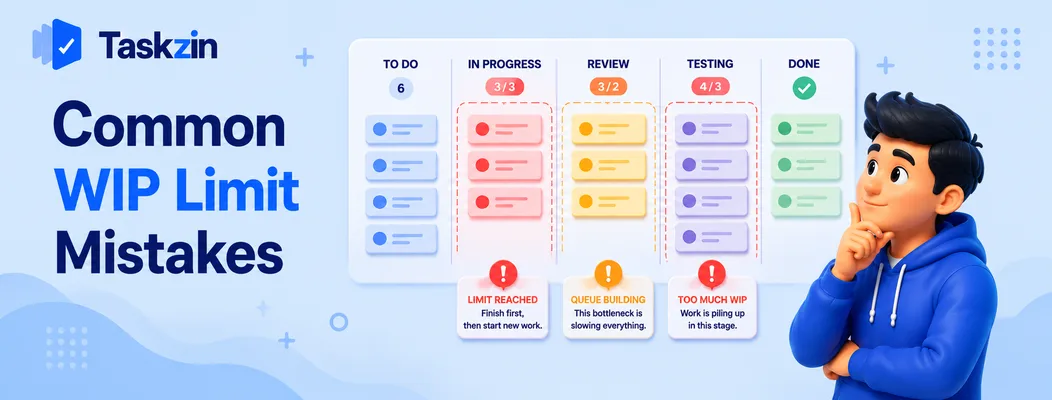
Three errors make WIP limits ineffective: setting them so high they are never felt, applying them to only one column, and raising them whenever they become inconvenient.
Setting the limit too high to be felt
A limit of fifteen for a team of five will never be reached. The team has technically adopted WIP limits and changed nothing.
The limit should be hit reasonably often. That discomfort is what generates the behaviour change.
Applying it only to In Progress
Limiting active development while leaving Review and Testing unlimited simply moves the queue downstream. Work stops piling up in one place and starts piling up in another.
Apply limits across the stages where queues form, not just the first one.
Raising the limit instead of fixing the bottleneck
The path of least resistance when a limit blocks work is to increase it. This removes the symptom and leaves the cause.
If Review is always full, the answer is more review capacity, smaller items, or fewer things needing review — not a higher number that lets work accumulate again.
Frequently asked
What is a WIP limit?
A cap on how many items may be in progress at once, usually per column on a board. When the limit is reached, nothing new starts until something finishes.
Why do WIP limits make work faster?
Because of Little's Law: cycle time equals work in progress divided by throughput. Halving concurrent work roughly halves how long each item takes, and less time is lost switching between tasks.
What should my WIP limit be?
A common starting point is one to two items per person in the active column. Some teams go lower deliberately to encourage collaboration. Adjust based on cycle time and how often the team is genuinely blocked.
What do you do when a column hits its WIP limit?
Help finish something in that column rather than starting new work. This is called swarming, and applying effort to the bottleneck improves output more than staying individually busy.
Do WIP limits apply to Scrum teams?
Yes. Scrum limits work at the sprint level, but WIP limits within the sprint prevent the common pattern where everything is started early and nothing completes until the final two days.
Can WIP limits be used by non-software teams?
Yes. Marketing, support, design, operations and recruitment all benefit. Any process where work passes through stages and queues form suits the technique.
Is it ever acceptable to break a WIP limit?
Occasionally, for a genuine emergency. Make it a visible, deliberate decision — teams that break limits casually find the practice erodes entirely within a month.
Sanju Shrestha is a SaaS content writer at Taskzin who explores smarter ways to manage work, organize priorities, and improve team performance. Her content covers productivity strategies, digital workflows, collaboration, and task management, with a focus on helping modern teams work more efficiently and stay aligned.
All posts by Sanju Shrestha


Comments