What Is a Kanban Board? A Plain-English Explanation
A beginner-friendly explanation of Kanban boards, covering what they are, how the pull system and WIP limits work, examples across different teams, how to set one up, how Kanban differs from Scrum, and common mistakes.


You have almost certainly seen one: a board with a few columns, cards moving left to right as work progresses. It looks simple enough that people assume there is nothing more to it.
There is, and the part usually missing is the part that produces the results.
This guide explains what a Kanban board is, how it works, how to set one up, and how it differs from the Scrum board it is often confused with.
Quick answer: Quick answer: A Kanban board is a visual tool that shows work as cards moving through columns representing the stages of your process. Each card is one piece of work; each column is a stage such as To Do, In Progress and Done. What distinguishes a genuine Kanban board from an ordinary board is a work-in-progress limit on each column, which caps how many items can sit there at once and forces bottlenecks into view.
What a Kanban Board Is

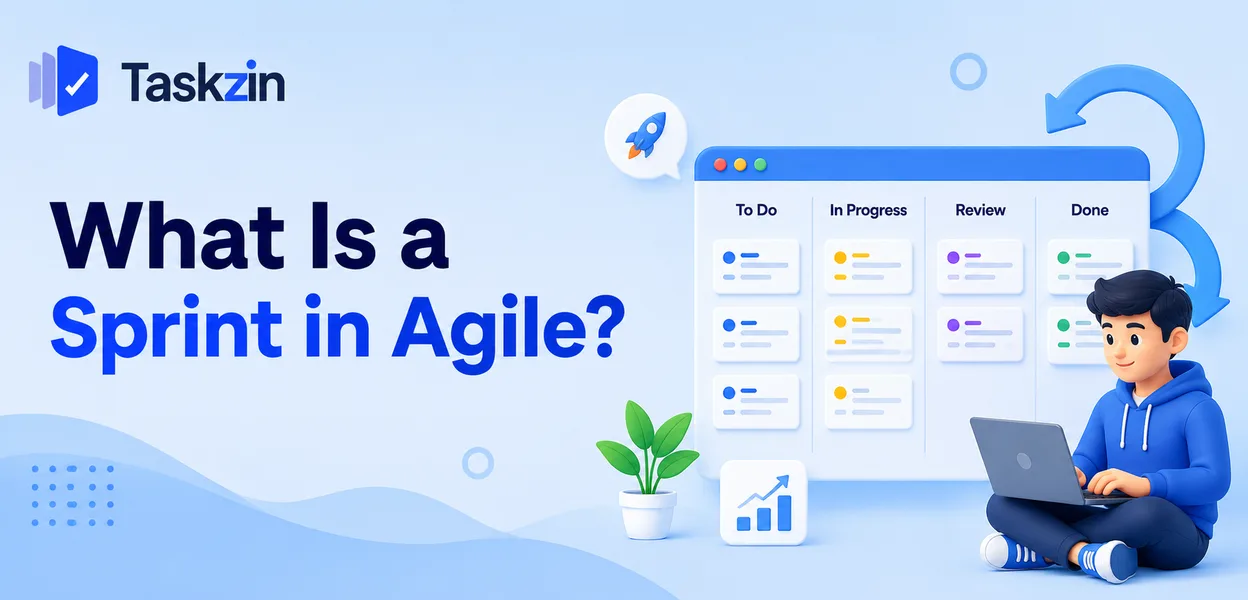
A Kanban board displays work as cards arranged in columns, where each column is a stage in your process and each card moves left to right as it progresses.
Columns, cards and the flow between them
The columns represent the states a piece of work passes through. The simplest board has three: To Do, In Progress, Done. Most real boards have five to seven.
Each card is one unit of work with enough on it to identify what it is and who has it. Work moves in one direction, and the board at any moment is an accurate picture of where everything stands — provided people move the cards as they work rather than before a meeting.
Where the idea came from
Kanban originated at Toyota as a manufacturing scheduling system. The Japanese word means signboard or signal card, and the original purpose was signalling that a workstation had capacity for more work.
That origin matters because it explains the part people miss. The point was never the visual board. It was that you cannot start something new until capacity frees up downstream.
What makes it Kanban rather than just a board
Any tool can display columns. Kanban adds three practices: visualise the work, limit work in progress, and manage flow so items move steadily instead of piling up.
The first is easy and everyone does it. The second is uncomfortable and most teams skip it.
Skipping it is why many teams report that Kanban made no difference — they adopted the appearance and left out the mechanism.
How a Kanban Board Works in Practice
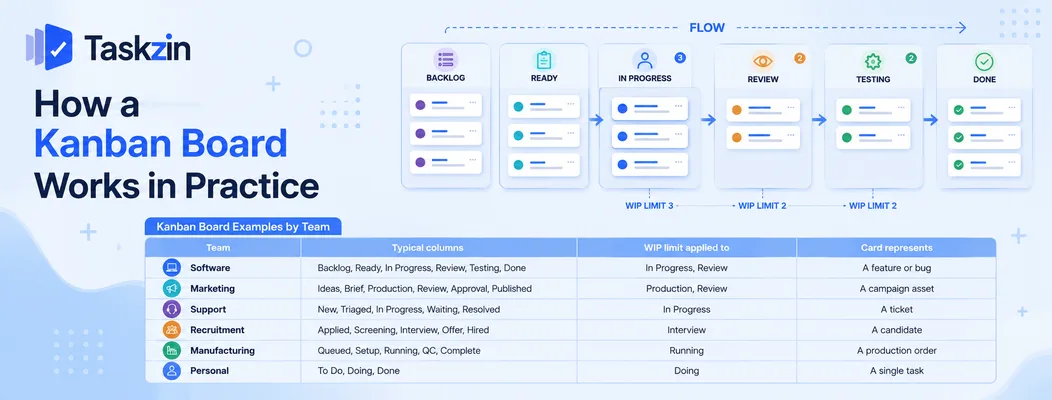
Work is pulled rather than assigned, each column has a cap on how many items it can hold, and the board's shape tells you where the process is struggling.
Pull, don't push
In a pull system, people take the next item when they have capacity, rather than having work assigned to them in advance.
This sounds like a small distinction and changes behaviour considerably. Pushed work accumulates in front of whoever is slowest; pulled work only moves when someone can actually take it, which makes the constraint visible instead of hidden in a queue.
WIP limits and what they do
A WIP limit caps how many cards may sit in a column. If In Progress has a limit of three and three cards are there, nobody starts a fourth until one moves out.
The immediate effect is frustrating and that is the point. Being unable to start something new forces you to help finish something that is stuck, and it makes the bottleneck impossible to ignore. If Review is permanently at its limit, your constraint is review capacity — a fact that a board without limits simply hides behind a long column everyone scrolls past.
Reading the board at a glance
A healthy board has work distributed across columns and moving. Cards clustering in one column indicate the bottleneck. Cards that have not moved for days are stuck, whatever their status says.
Some teams mark card age to make this explicit, so a card sitting for a week is visibly different from one that arrived this morning.
Kanban Board Examples by Team
Team Typical columns WIP limit applied to Card represents Software Backlog, Ready, In Progress, Review, Testing, Done In Progress, Review A feature or bug Marketing Ideas, Brief, Production, Review, Approval, Published Production, Review A campaign asset Support New, Triaged, In Progress, Waiting, Resolved In Progress A ticket Recruitment Applied, Screening, Interview, Offer, Hired Interview A candidate Manufacturing Queued, Setup, Running, QC, Complete Running A production order Personal To Do, Doing, Done Doing A single task
How to Set One Up
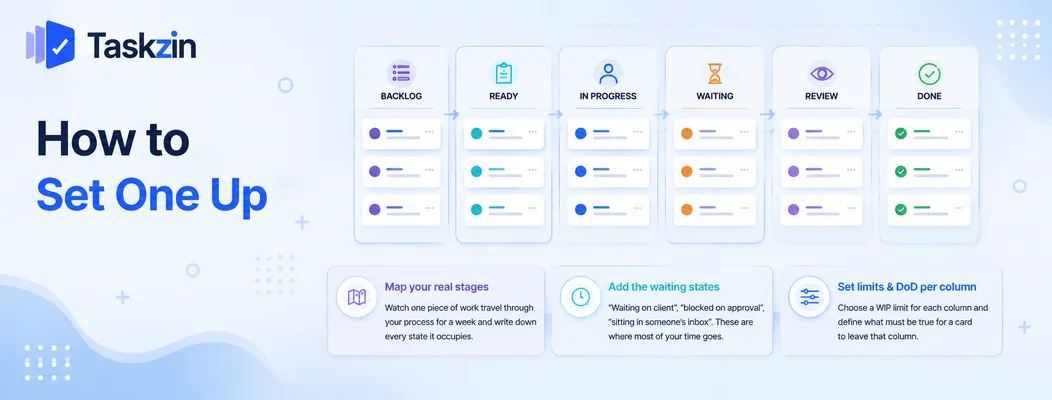
Map the stages your work genuinely passes through, include the waiting states you would rather not admit to, and set a limit and a completion rule for each column.
Map your real stages
Watch one piece of work travel through your process for a week and write down every state it occupies. Not the idealised process — the actual one.
Boards built from an imagined process do not match reality, so people stop trusting them within a fortnight.
Add the waiting states you would rather hide
"Waiting on client", "blocked on approval", "sitting in someone's inbox". These feel like they clutter the board, and they are where most of your elapsed time goes.
Making them visible is uncomfortable and immediately useful. A board that shows six items waiting on one approver has diagnosed a problem that a tidy three-column board would conceal.
Set limits and a definition of done per column
Choose a WIP limit for each column — roughly one to two items per person is a common starting point — and write one line stating what must be true for a card to leave.
Without the completion rule, cards move when someone feels like moving them and the board stops reflecting truth. With it, the board stays trustworthy over time, which is the whole basis of its usefulness.
Kanban Versus Scrum Boards

A Scrum board resets each sprint and holds a fixed commitment; a Kanban board runs continuously and controls workload through WIP limits rather than through sprint scope.
The sprint boundary
A Scrum board is cleared and repopulated at the start of each sprint. A Kanban board is continuous — work flows through it without a reset.
That makes Kanban a better fit for teams with unpredictable incoming demand, such as support or platform teams, where committing to two weeks of scope is unrealistic.
How work is committed
Scrum commits to a batch of work for the sprint. Kanban commits to a limit on concurrent work and pulls the next item when capacity allows.
Neither is superior. They are different mechanisms for the same underlying problem of not taking on more than you can finish.
Which suits which team
Scrum suits teams with reasonably predictable work and stakeholders who want a planning rhythm. Kanban suits teams with variable, interrupt-driven demand.
A useful signal: a team that abandons its sprint commitment most sprints because urgent work arrived is a Kanban team currently pretending to run Scrum.
Common Kanban Board Mistakes
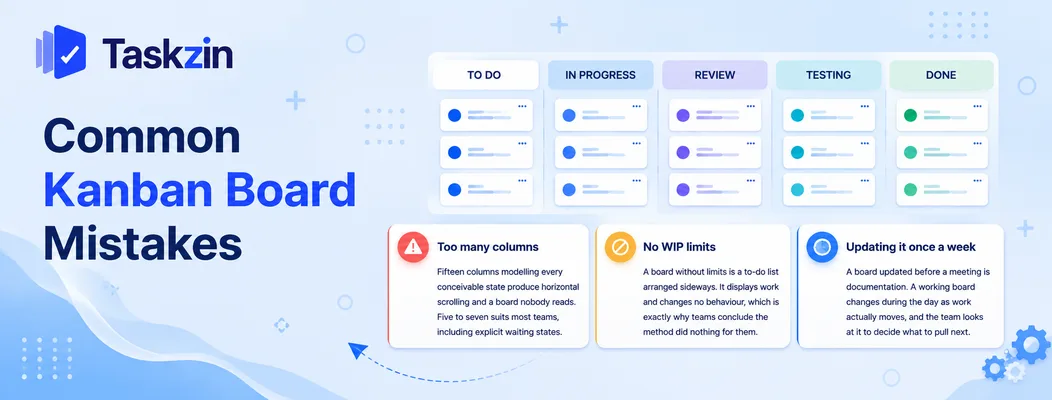
Boards fail for three reasons: too many columns, no WIP limits, and being treated as a report rather than a working tool.
Too many columns
Fifteen columns modelling every conceivable state produce horizontal scrolling and a board nobody reads. Five to seven suits most teams, including explicit waiting states.
No WIP limits
A board without limits is a to-do list arranged sideways. It displays work and changes no behaviour, which is exactly why teams conclude the method did nothing for them.
Updating it once a week
A board updated before a meeting is documentation. A working board changes during the day as work actually moves, and the team looks at it to decide what to pull next.
Frequently asked
What is a Kanban board?
A visual tool showing work as cards moving through columns that represent the stages of your process, with a limit on how many items can occupy each column at once.
How does a Kanban board work?
Work is pulled rather than pushed: someone takes the next card when they have capacity. WIP limits cap each column, so nothing new starts until something finishes, which makes bottlenecks visible.
What are the columns on a Kanban board?
Whatever stages your work genuinely passes through. The simplest is To Do, In Progress and Done; most teams use five to seven, including explicit waiting states such as blocked or awaiting approval.
What is a WIP limit?
A cap on how many cards can sit in a column at once. When the column is full, nobody may pull new work into it, which forces the team to finish existing work and exposes the constraint.
What is the difference between Kanban and Scrum?
A Scrum board resets each sprint around a fixed commitment. A Kanban board runs continuously and manages workload through WIP limits instead of sprint scope.
Can Kanban be used outside software?
Yes. Marketing, support, recruitment, legal, operations and manufacturing all use it. Any process where work passes through repeatable stages suits the method.
Do you need software for a Kanban board?
A physical board works well for a co-located team of under about eight. Software becomes necessary once anyone works remotely, or when you want cycle-time history you cannot reconstruct from sticky notes.
Sanju Shrestha is a SaaS content writer at Taskzin who explores smarter ways to manage work, organize priorities, and improve team performance. Her content covers productivity strategies, digital workflows, collaboration, and task management, with a focus on helping modern teams work more efficiently and stay aligned.
All posts by Sanju Shrestha
Comments