Time Blocking: How It Works and Who It's For
A practical assessment of time blocking, covering what the method actually does, its variants, how to start realistically, who it suits and who it does not, how to keep it working through bad weeks, and common mistakes.


The method works well for people whose work is largely under their own control and poorly for people whose day is driven by incoming demand. Knowing which you are saves a lot of wasted effort.
Quick answer: Time blocking means assigning specific tasks to specific slots in your calendar rather than working from an open list. Its value is not organisation — it is that a calendar has a fixed size and a list does not, so blocking forces you to confront how much you can actually do.
That confrontation is uncomfortable and is the entire mechanism.
What Time Blocking Actually Does

Blocking converts an unbounded list into a bounded schedule, forcing decisions about what will not happen.
It confronts you with capacity
A to-do list can hold thirty items. A Tuesday cannot.
When you place tasks into actual hours, the arithmetic becomes visible: three of these fit, the other twelve do not. Most people discover their list represents two or three weeks of work rather than a day, and that realisation is more useful than any organisational benefit.
Deciding when, not just what
Ordinary task management answers what to do. Blocking answers when, which is a different and harder question because it requires an honest estimate of duration.
It also removes the decision cost at the moment of starting. You do not arrive at 10am and choose from a list — the choice was made when you planned, at a point when you were thinking clearly rather than reacting.
What it is not
It is not a commitment to other people, and it is not a productivity guarantee. A blocked calendar that you ignore is a list with extra steps.
It also does not create time. If your work genuinely exceeds your hours, blocking makes that visible rather than solving it — which is valuable, but only if you act on what it reveals.
Variants of the Method
Variant How it works Best for
How to Start Time Blocking

Every task assigned a specific slot Controllable work, deep focus Task batching Similar tasks grouped into one block Email, admin, calls, reviews
Day theming Each day dedicated to one type of work Roles with distinct modes Time boxing Fixed duration set for a task, stop when it ends Work that expands to fill time Partial blocking Block only deep work, leave the rest open Most people, most weeks
How to Start Time Blocking Place fixed commitments first, estimate generously, and leave unassigned gaps rather than filling every hour.
Block the known commitments first
Meetings, appointments, recurring obligations. These are not negotiable, so they define the shape of what is left.
What remains is your actual available time, which is usually far less than the working day suggests. Seeing that before you plan anything else sets realistic expectations.
Estimate generously, then halve your ambition
People underestimate task duration consistently and in one direction. Whatever you think something takes, it usually takes longer.
Two practical corrections: add roughly 50 percent to your instinctive estimate, and plan fewer blocks than you think will fit. A day with three completed blocks feels successful; a day with seven planned and three completed feels like failure, despite identical output.
Leave deliberate gaps
Do not fill every hour. Leave unassigned time — commonly a quarter of the day — for the things that arrive.
Without gaps, the first interruption destroys the schedule and you abandon it. With gaps, interruptions are absorbed and the plan survives. This is the single most common difference between people for whom blocking works and people for whom it does not.
Who It Works For and Who It Doesn't
Time blocking suits people who control most of their day and struggle with overcommitment; it suits reactive roles poorly.
Suits: work you control, deep focus, chronic overcommitment
Writers, developers, designers, analysts, researchers — anyone whose output requires sustained concentration and whose day is mostly self-directed.
It also suits anyone who consistently takes on more than fits. Blocking makes that pattern visible in a way a list never will, because a list absorbs infinite items without complaint.
Struggles: reactive roles, high interrupt volume
Support, operations, account management, anyone on a rota. When most of your day is determined by what arrives, blocking specific tasks to specific hours produces a schedule that is wrong by 10am.
Batching works better here — one block for handling whatever came in, rather than blocks for named tasks.
The partial version most people end up with
Most people who try full blocking settle into something lighter: two or three protected deep-work blocks a week, batching for admin, and the rest of the calendar open.
This is not a failure of the method. It is the version that survives contact with a real job, and it captures most of the benefit.
Making It Survive a Bad Week
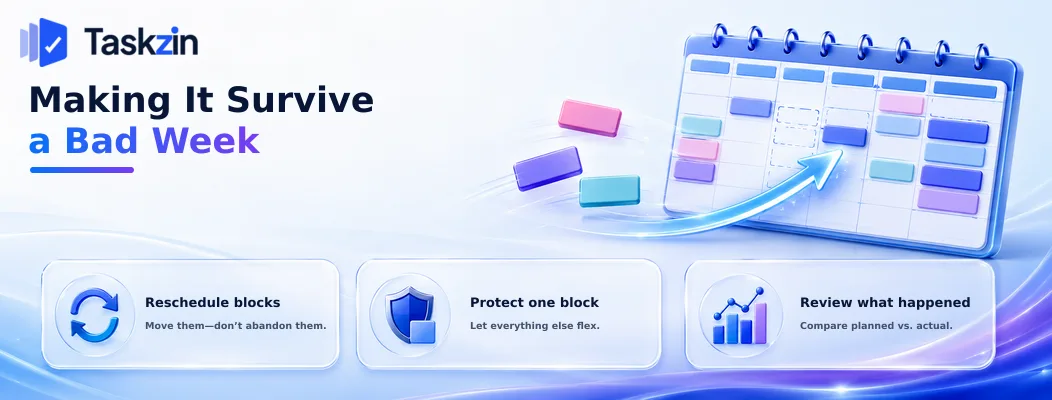
When the plan breaks, reschedule rather than abandoning it, protect one block rather than all of them, and review what actually happened.
Reschedule, don't abandon
The commonest failure is that one disrupted day ends the practice entirely.
When a block is lost, move it rather than deleting it. The plan is a working document, not a contract, and the ability to adjust it is what makes it durable.
Protect one block, not all of them
In a bad week, defending your whole schedule is unrealistic and defending nothing is a waste.
Pick one block — the most important piece of work — and protect that absolutely. Everything else flexes. This keeps the practice alive through periods where full blocking is impossible.
Review what actually happened
Once a week, compare what you planned against what happened. Not to feel bad about it — to calibrate.
Most people discover a consistent pattern: they plan 40 percent more than fits, or a particular type of task always overruns. Both are correctable once measured, and invisible until then.
Where your tasks live in a system that records when they were actually completed, this comparison takes minutes rather than requiring recollection.
Common Time Blocking Mistakes
The three failures are blocking every available minute, treating the plan as a promise to others, and never checking the plan against reality.
Blocking every minute
A fully packed calendar has no capacity to absorb anything, which means the first unplanned event breaks it entirely.
Leave a quarter of the day unassigned. Counterintuitively, a less complete plan is a more durable one.
Treating the plan as a commitment to others
Your blocks are decisions about your own attention, not commitments you owe anyone.
People who treat a missed block as a failure abandon the method within a fortnight. It is a plan, and plans change.
Never comparing plan to reality
Blocking without review means repeating the same estimation errors indefinitely.
Fifteen minutes weekly comparing planned against actual is what converts blocking from a scheduling habit into an accurate model of your own capacity.
Frequently asked
What is time blocking?
Assigning specific tasks to specific slots in your calendar rather than working from an open list, so that the fixed size of a day forces decisions about what will not get done.
Does time blocking actually work?
It works well for people whose day is largely self-directed and who struggle with overcommitment. It works poorly for reactive roles where most of the day is determined by incoming demand.
How long should a time block be?
Typically 60 to 120 minutes for focused work — long enough to get into the task, short enough to stay realistic. Shorter blocks suit batched admin.
What is the difference between time blocking and time boxing?
Time blocking assigns a task to a slot. Time boxing sets a fixed duration and stops when it ends regardless of completion. Boxing is useful for work that expands to fill available time.
What do you do when a block gets interrupted?
Reschedule it rather than abandoning the plan. Leaving a quarter of the day unassigned means most interruptions can be absorbed without disrupting anything else.
Is time blocking good for reactive jobs?
Not in its classic form. Batching works better — one block for handling whatever arrives, rather than blocks assigned to named tasks that will not survive the morning.
Should you block time for admin and email?
Yes, as batched blocks rather than handling them continuously. Two fixed windows a day is enough for most roles and removes a large source of fragmentation.
Sanju Shrestha is a SaaS content writer at Taskzin who explores smarter ways to manage work, organize priorities, and improve team performance. Her content covers productivity strategies, digital workflows, collaboration, and task management, with a focus on helping modern teams work more efficiently and stay aligned.
All posts by Sanju Shrestha


Comments