10 Best Notion Alternatives for Project Management
A comparison of ten Notion alternatives for project management, covering where Notion falls short as a tracker, ten reviewed options, how to split documentation from delivery, migration steps, and when Notion is still right.


Notion is excellent software being asked to do a job it was not designed for. As a wiki, a knowledge base and a writing environment it is genuinely strong. As a system for tracking who is doing what by when, it is missing the specific features that make project tools work.
This guide covers where Notion falls short as a tracker, ten alternatives, how to decide between replacing and supplementing it, and when it remains the right choice.
Quick answer: The best Notion alternatives for project management are Taskzin and Asana as purpose-built replacements, ClickUp if you want to keep documents and projects together, and Coda if you want Notion's flexibility with stronger automation. Most teams do not need to abandon Notion entirely — they need to stop using it as a project tracker.
Why Notion Struggles as a Project Tool
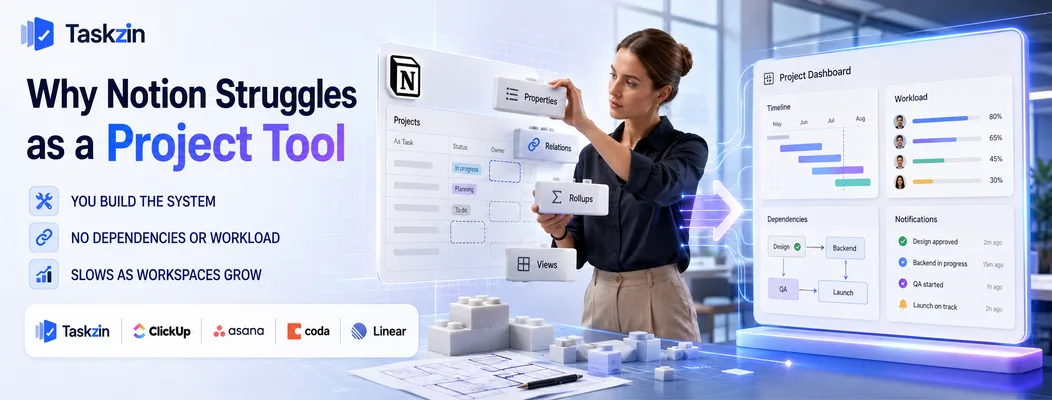
Notion struggles as a project tool because it gives you a construction kit rather than a system — you build the tracker yourself, maintain it yourself, and still lack dependencies, workload views and reliable notifications.
This is not a criticism of the product. Notion is deliberately a flexible workspace, and flexibility and purpose-built structure are opposites. The trouble starts when a team adopts it for documentation and gradually asks it to run delivery.
You build the system, then you maintain it
Setting up project tracking in Notion means designing databases, relations, rollups, filtered views and templates. It is genuinely satisfying to build, and one person usually builds it.
That person becomes the system's owner by accident. When they get busy, leave, or simply stop caring, the structure degrades — views drift, properties multiply, and nobody is confident the board reflects reality. A purpose-built tool ships with these decisions already made and maintained by the vendor.
No dependencies, workload or notifications that work
Three specific gaps cause most of the pain. Notion has no true task dependencies, so you cannot model what must finish before something else starts. It has no workload view, so you cannot see whether an assignee is overloaded. And its notifications are weak enough that people rely on being told in chat instead.
That last one is decisive. If a project tool does not reliably tell you that something was assigned to you or that a deadline moved, its data will always be secondary to a conversation happening elsewhere.
Performance degrades as the workspace grows
A Notion workspace with a few hundred pages is fast. One with thousands of pages, deeply nested databases and multiple rollups across linked views becomes noticeably slower, particularly on mobile and particularly when loading a filtered board.
This matters more than it sounds. A tracker that takes several seconds to open is a tracker people check less often, and one they check less often holds data they trust less. The degradation is gradual enough that teams adapt to it without noticing, which is why the complaint usually surfaces as "nobody keeps it updated" rather than as a performance issue.
Purpose-built project tools are optimised for exactly one access pattern — showing a filtered list of tasks quickly — and they stay fast as the number of records grows. That is an unglamorous advantage, but it is the one that determines whether the tool is opened ten times a day or once a week.
Notion Alternatives Compared at a Glance
Tool Best for Dependencies Docs built in Free plan Taskzin Purpose-built replacement Yes Yes Yes ClickUp Docs plus projects Yes Yes Yes Asana Structure and ownership Yes Limited Yes Coda Flexible
Split your workspace deliberately
Via packs Yes Yes Airtable Database-driven work Limited No Yes Monday.com Visual tracking Yes Limited Limited Linear Product teams Yes Yes Yes Confluence + Jira Docs and tracking pair Yes Yes Yes (small teams) Basecamp Client work No Yes Limited Obsidian / Craft Notes without projects No Yes Yes
The 10 Best Notion Alternatives
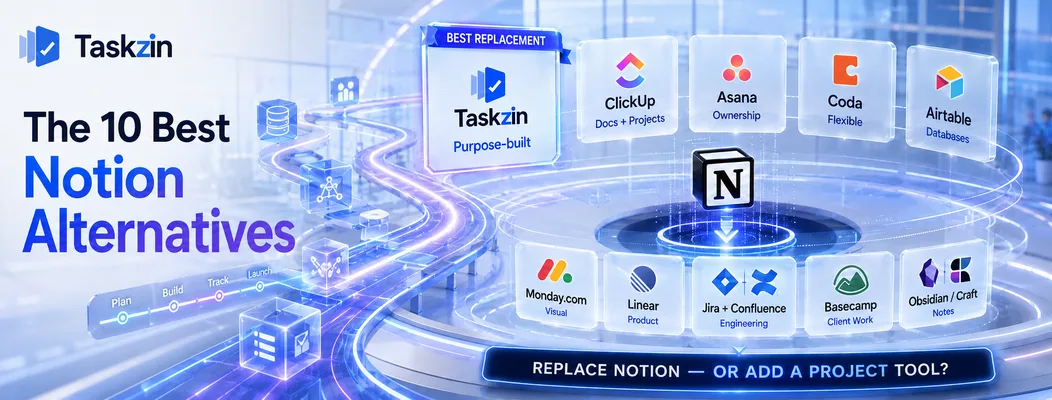
Taskzin — best purpose-built replacement
Taskzin provides the project structure Notion lacks — dependencies, ownership, timelines, reliable notifications — without requiring you to design the system yourself.
Best for: teams that built a Notion tracker and are tired of maintaining it.
Trade-off: less freeform than Notion for pure documentation and wiki work.
ClickUp — best for keeping docs and projects together
ClickUp includes a document editor alongside real project features, which appeals to teams that liked having everything in one workspace.
Best for: teams unwilling to split documentation and delivery across two tools.
Trade-off: the document editor is less pleasant to write in than Notion's.
Asana — best for project structure and ownership
Asana is the clearest expression of the thing Notion cannot do: unambiguous ownership, dates, dependencies and a personal view of everything assigned to you.
Best for: teams whose core problem is that nobody knows who owns what.
Trade-off: thin documentation, so you will keep Notion or add something else.
Coda — best like-for-like flexible workspace
Coda is Notion's closest competitor, with a similar document-and-database model plus stronger automation and formula capability.
Best for: teams that want Notion's flexibility but need better automation.
Trade-off: it shares Notion's fundamental issue — you still build and maintain the system.
Airtable — best for database-driven work
If your Notion databases were the point and the documents were incidental, Airtable handles structured records better, with stronger views and integrations.
Best for: content pipelines, asset libraries and inventory-style work.
Trade-off: weaker as a writing tool and as a day-to-day task manager.
Monday.com — best for visual project tracking
Monday gives non-technical teams visible status without requiring anyone to design a database schema first.
Best for: marketing and operations teams that found Notion too abstract.
Trade-off: documentation is minimal, and seat-tier pricing can force overbuying.
Linear — best for product teams
Linear replaces a Notion-based product backlog with a fast, purpose-built issue tracker that includes documents for specs.
Best for: small product and engineering teams.
Trade-off: narrow fit outside product development.
Confluence with Jira — best documentation plus tracking pair
This is the established split: Confluence for knowledge, Jira for delivery, linked together.
Best for: engineering organisations wanting depth in both.
Trade-off: two tools, two subscriptions, and considerably more administration.
Basecamp — best all-in-one for client work
Basecamp bundles messages, documents, to-dos and schedules with flat pricing and unlimited users.
Best for: agencies wanting one simple place for client projects.
Trade-off: deliberately limited — no custom fields, no dependencies, no reporting.
Obsidian and Craft — best for notes without project overhead
If you concluded that you needed a better writing tool rather than a project tool, these are stronger for personal and small-team knowledge work.
Best for: individuals and small groups whose real need was notes.
Trade-off: no project management capability at all.
How to Choose a Notion Replacement
Separate the documentation problem from the tracking problem
will own the system, and test notifications before anything else — that is the feature whose absence quietly breaks Notion as a tracker.
Separate the documentation problem from the tracking problem Most teams do not have one problem. They have a documentation tool being asked to track delivery.
The question is therefore not "what replaces Notion" but "should I replace it, or add a project tool beside it and let Notion do what it is good at?" For many teams the second answer is correct and considerably cheaper than migrating a wiki that works.
Decide who owns the system
If you move to another flexible tool — Coda, Airtable, or ClickUp configured heavily — you are choosing to keep owning the system design. That is fine when someone genuinely enjoys it and has time.
If nobody does, choose a tool with opinions. Asana, Linear and Taskzin all make structural decisions for you, which is precisely what teams tired of Notion maintenance are looking for.
Test notifications before anything else
Assign a task to a colleague in the candidate tool and see what actually reaches them — email, push, in-app, and whether it is clear. Then change the due date and see whether that notifies too.
This unglamorous test predicts whether the tool becomes the source of truth or another place data goes to be ignored.
Migrating From Notion
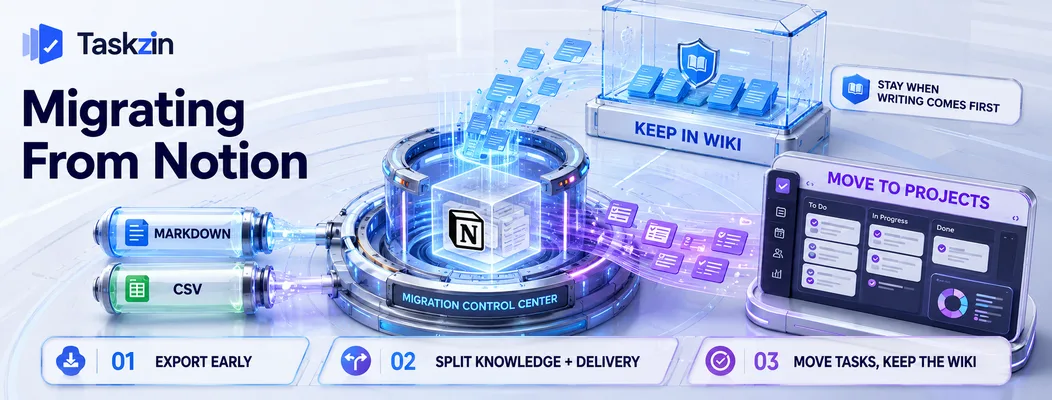
Export your workspace to markdown and CSV early, decide deliberately how to split knowledge from delivery, and keep the wiki in place while moving only the task tracking.
Export markdown and CSV early
Notion exports pages as markdown or HTML and databases as CSV. Do this while your workspace is active and keep the archive.
Databases with relations and rollups do not survive export cleanly — those connections flatten. Note which relations matter before exporting so you can rebuild them intentionally rather than discovering them missing.
Split your workspace deliberately Go through your Notion workspace and label each area as knowledge, delivery, or both.
Knowledge usually stays. Delivery moves. The "both" items need a decision, and making it explicitly prevents the half-migrated state where nobody knows which tool holds the truth.
Keep the wiki, move the tasks
For most teams the practical outcome is Notion as documentation and a purpose-built tool for tracking, linked from each other. This costs one additional subscription and removes almost all of the pain, at a fraction of the effort of a full migration.
When Notion Is Still the Right Choice
Stay with Notion if your work is genuinely writing-first with tasks as a by-product, or if you have someone who enjoys building and maintaining the system.
Your work is genuinely writing-first
Research teams, content operations, consultancies and product teams that live in specs all produce documents as their primary output. For them, tasks are annotations on documents rather than the other way round.
Moving that work into a task-first tool inverts the model and makes the important artefact secondary.
You have someone who enjoys building the system
The maintenance burden is only a burden when it is unwanted. A team with an enthusiastic owner who genuinely likes refining databases and templates gets a system fitted precisely to how they work.
Just be aware of the concentration risk. If that person leaves, the system usually degrades within a quarter, so keep the structure documented and simple enough for someone else to inherit.
Frequently asked
What is the best Notion alternative for project management?
Taskzin and Asana as purpose-built replacements, ClickUp if you want documents and projects in one place, and Coda if you want Notion's flexibility with stronger automation.
Is Notion good for project management?
For small teams with simple, independent tasks, yes. It lacks true dependencies, workload views and reliable notifications, which are the features that matter once several people coordinate on interdependent work.
What is the best free Notion alternative?
ClickUp and Taskzin offer free plans with real project features. Coda and Airtable have free tiers closer to Notion's model. Obsidian is free for personal knowledge work.
Is ClickUp better than Notion?
For project tracking, yes — it has dependencies, workload views and proper notifications. For writing and documentation, Notion remains more pleasant. Many teams end up using both.
Can you export data from Notion?
Yes. Pages export as markdown or HTML, databases as CSV. Relations and rollups flatten during export, so note which connections matter before you migrate.
What is the closest tool to Notion?
Coda is the closest in model and philosophy, combining documents with databases. Airtable is closest if your use was primarily structured data rather than writing.
Should you replace Notion or add a project tool alongside it?
For most teams, adding one is better. Keep Notion for documentation where it excels, and use a purpose-built tool for tracking. That avoids migrating a wiki that is working perfectly well.
Binita Ray is a content writer at Taskzin, creating insightful and practical content on task management, team collaboration, productivity, workflow optimization, and SaaS solutions. She focuses on helping businesses, teams, and professionals simplify their work processes, improve efficiency, and make better use of modern productivity tools.
All posts by Binita Ray
Comments