Best Team Collaboration Tools
A guide to the best team collaboration tools, covering the four jobs collaboration software does, ten reviewed tools, how to assign one tool per job, when to choose synchronous over asynchronous, and the habits that cause sprawl.


The common failure is not a missing capability. It is that a team has six tools, each partly used, with no agreement about where anything lives. A decision is made in chat, referenced in a document, and never reflected in the task, so three sources disagree and everyone asks a person instead.
This guide covers the four categories, ten tools, how to assemble a stack without sprawl, and how to decide what belongs in a meeting versus in writing.
Quick answer: The best team collaboration tools cover four distinct jobs: Slack or Microsoft Teams for conversation, Taskzin or a project tool for work and decisions, Notion or Google Workspace for documents, and Miro for visual thinking. Most teams do not need better tools — they need clearer rules about which tool holds what.
The Four Kinds of Collaboration Tool
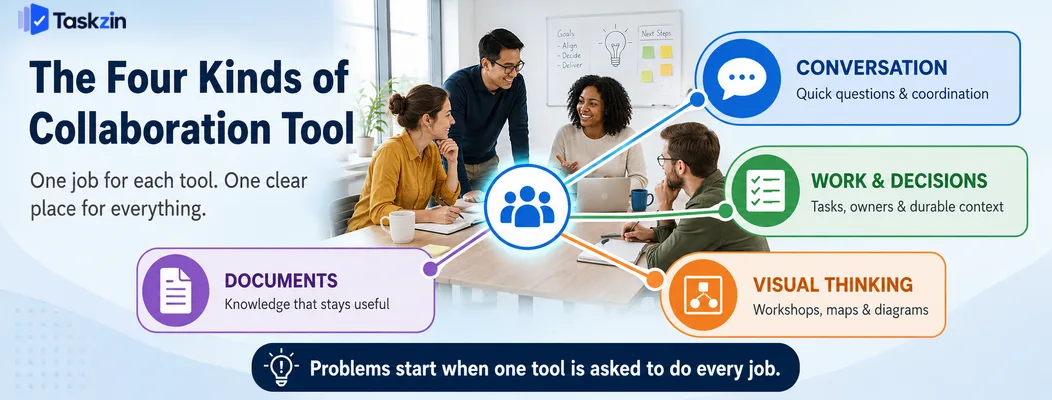
Collaboration tools divide into four jobs — real-time conversation, durable work tracking, shared documents, and visual thinking — and problems usually come from asking one category to do another's job.
Chat is the usual offender, because it is the most convenient place to put anything and the worst place to find it later.
Real-time conversation
Chat handles quick questions, coordination and the informal contact that keeps a team functioning, particularly when distributed.
Its defining property is that it scrolls. Anything not captured elsewhere within a day or two is effectively gone. That is fine for "are you free at three?" and disastrous for "we agreed to drop the second phase".
Durable work and decisions
This is the project tool: tasks with owners, dates, status and comment threads attached to specific pieces of work.
The key property is permanence with context. A comment on a task is still there in six months, still attached to the thing it concerns, and findable by anyone who opens that work. This is why a project tool rather than a chat tool should be the system of record.
Shared documents and knowledge
Documents hold the things too long or too structured for a task: specs, research, policies, onboarding guides, meeting notes.
The distinction from tasks is lifespan and shape. A task is a unit of work that completes; a document is reference material that persists and gets updated.
Visual and synchronous thinking
Whiteboards and diagramming tools handle the work that is genuinely spatial — system architecture, customer journeys, story mapping, workshop facilitation.
This is the one category where synchronous is often better. A live workshop on a shared canvas produces things that written exchange does not, particularly early in a problem.
Best Team Collaboration Tools at a Glance
Tool Category Best for Free plan
Taskzin — best for keeping decisions attached to work
Slack — best real-time team chat
Microsoft Teams — best for Microsoft 365 organisations
Notion — best shared knowledge base
Google Workspace Documents Live co-editing Yes Miro Visual Workshops and diagrams Yes Loom Async video Explaining without a meeting Yes
Confluence — best structured documentation
Zoom — best for scheduled synchronous meetings
Basecamp Consolidated Fewer tools by design Limited
The Best Collaboration Tools Reviewed
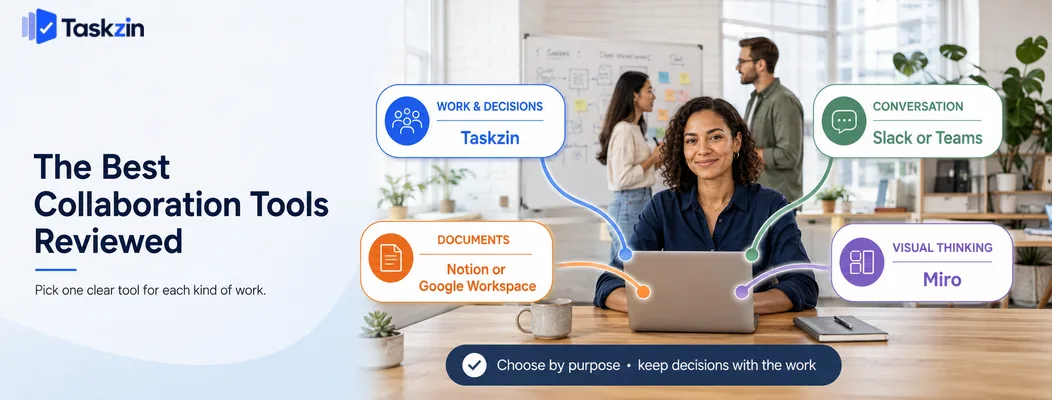
Taskzin — best for keeping decisions attached to work Taskzin holds discussion, decisions and status on the task itself, which means the answer to "why did we do it this way?" sits with the work rather than in a chat thread nobody can find.
Best for: teams whose main problem is that decisions disappear.
Trade-off: not a chat tool, so you will still want something for real-time conversation.
Slack — best real-time team chat Slack remains the strongest dedicated chat tool, with channel organisation, threads and an extensive integration ecosystem.
Best for: teams wanting fast, informal communication with good search.
Trade-off: it invites use as a system of record, which it handles badly.
Microsoft Teams — best for Microsoft 365 organisations Teams combines chat, meetings and file collaboration inside the Microsoft ecosystem, and is already licensed for most organisations using Microsoft 365.
Best for: companies standardised on Microsoft.
Trade-off: heavier and less refined than Slack for pure chat.
Notion — best shared knowledge base Notion holds documentation, meeting notes, policies and reference material in a searchable, linkable structure.
Best for: teams building institutional memory.
Trade-off: weak notifications, so it should not be your task tracker.
Google Workspace — best for document co-editing
Google Docs and Sheets remain the best live co-editing experience, and the sharing model is understood by almost everyone.
Best for: collaborative writing and analysis, including with external parties.
Trade-off: documents proliferate in Drive without structure, so knowledge becomes hard to find.
Miro — best visual collaboration
Miro's infinite canvas suits workshops, system diagrams, journey maps and retrospectives, with templates for most common formats.
Best for: distributed teams running workshops that would previously have needed a room.
Trade-off: outputs need transferring into your task or document tool afterwards, or they are lost.
Loom — best asynchronous video
Loom lets someone record a screen walkthrough in two minutes instead of scheduling a thirty-minute call, which is particularly valuable across time zones.
Best for: demos, feedback on visual work, and explanations that are awkward in writing.
Trade-off: video is not searchable in the way text is, so decisions should still be written down.
Confluence — best structured documentation Confluence provides organised, permissioned documentation with strong Jira integration.
Best for: engineering organisations already using Atlassian tools.
Trade-off: less pleasant to write in than Notion, and a separate subscription.
Zoom — best for scheduled synchronous meetings Zoom remains reliable for scheduled calls, particularly with external participants who may not have your chat tool.
Best for: client calls, interviews and workshops.
Trade-off: easy to over-use, since scheduling a call is often easier than writing clearly.
Basecamp — best deliberately consolidated option
Basecamp bundles messages, to-dos, documents, schedules and chat with a strong opinion about how teams should communicate.
Best for: teams that want fewer tools and are willing to accept its constraints.
Trade-off: each individual component is weaker than the best specialist alternative.
How to Build a Collaboration Stack Without Tool Sprawl
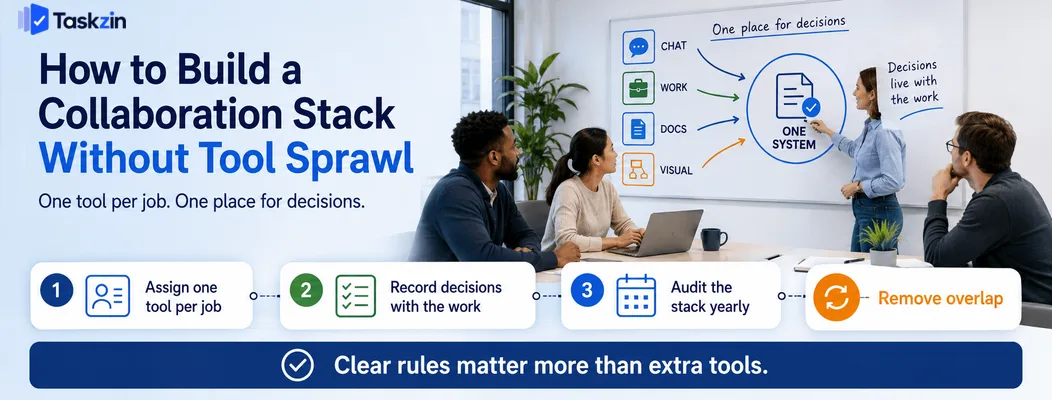
Assign exactly one tool per job, state publicly where decisions are recorded, and review the stack once a year to remove what nobody uses.
Assign one tool per job and say so out loud
Write down the mapping: conversation happens here, work lives here, documents live here, diagrams live here. Share it, and put it in onboarding.
Most teams have never done this explicitly, which is why the same information ends up in three places. The rule matters more than which tools you pick — two teams with identical stacks can have completely different experiences depending on whether they agreed the boundaries.
Decide where decisions are recorded
This is the single highest-value rule. Pick one place — normally the task or the document the decision concerns — and require that decisions land there regardless of where they were made.
A decision reached on a call is not a decision until someone writes it down. Discussing it in chat and then linking to the written record is fine; leaving it only in chat is not, because in three months nobody will find it and the discussion will happen again.
Audit the stack annually
Once a year, list every tool, what it costs, and who genuinely uses it. Tools accumulate through individual enthusiasm and rarely leave without a deliberate decision.
Look particularly for overlap — two tools doing the same job usually means neither is trusted, and the team is paying twice for confusion.
Synchronous or Asynchronous: Choosing Per Situation
Reserve meetings for decisions, difficult conversations and genuine collaboration; put status, updates and coordination in writing; and attach anything about a specific piece of work to that work.
What genuinely needs a meeting
Contentious decisions, sensitive feedback, early creative work, and relationship building. These share a common feature: the exchange is unpredictable, and reading tone matters.
A meeting is expensive — six people for an hour is a day of collective time — so it should be reserved for things that genuinely need it rather than used as the default.
What belongs in writing
Status updates, decision records, proposals, and anything the reader needs to consider before responding.
Writing carries a real advantage beyond convenience: it forces clarity. A vague proposal survives a meeting through tone and momentum; the same vagueness is obvious on the page, which is often exactly why people prefer to present it live.
What belongs on a task
Anything concerning one specific piece of work — feedback, blockers, decisions about scope, questions about implementation.
The test is simple: if someone opens this task in six months, would they want to see this? If yes, it belongs there rather than in chat.
Common Collaboration Mistakes
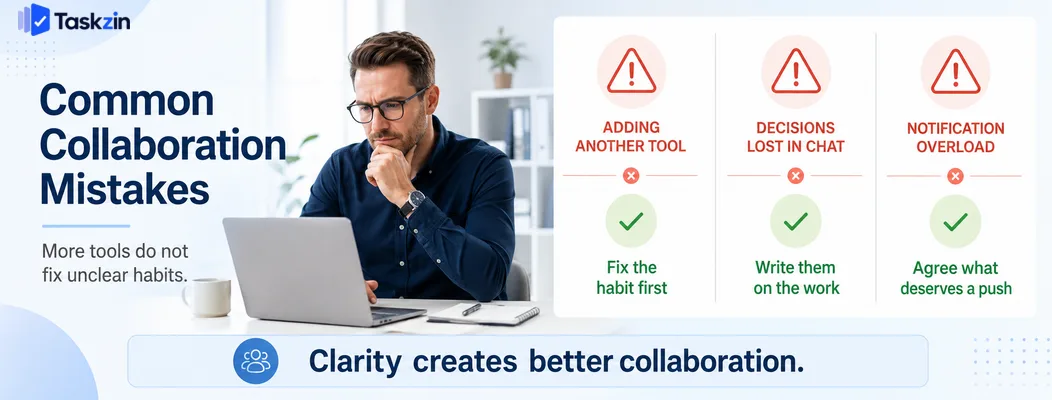
The recurring failures are adding a tool to solve a habit problem, letting chat become the system of record, and never configuring notifications.
Adding a tool instead of fixing a habit
Teams frequently buy software to solve a discipline problem. If people are not writing decisions down, a new documentation tool will not change that — it will become another place things are not written.
Fix the habit first, with an explicit rule and a few weeks of reminders. Add tooling only when a genuine capability is missing.
Letting chat become the system of record
Chat is convenient at the moment of writing and useless at the moment of retrieval. When it becomes the default record, the team's institutional memory has a shelf life of roughly two weeks.
Notification settings nobody has configured
Default notification settings across five tools produce constant interruption. People respond by muting everything, which means genuinely urgent messages get missed too.
Spend twenty minutes as a team agreeing what warrants a push notification. This is unglamorous and returns more focused time than any tool change.
Frequently asked
What are the best team collaboration tools?
Slack or Microsoft Teams for conversation, Taskzin or a project tool for work and decisions, Notion or Google Workspace for documents, and Miro for visual collaboration. Most teams need one from each category.
What is the difference between collaboration and project management software?
Collaboration tools support communication and shared work generally. Project management software specifically tracks tasks, owners, dates and dependencies. Most teams need both, with the project tool as the system of record.
What are the best free team collaboration tools?
Slack, Google Workspace, Notion, Miro, Loom and Taskzin all offer free tiers workable for small teams. Google Workspace and Slack free plans cover the two most common needs at no cost.
Is Slack or Microsoft Teams better?
Slack is better as a pure chat tool with a stronger integration ecosystem. Teams is better if you already pay for Microsoft 365, since it is included and integrates with Office files and calendars.
How many collaboration tools should a team use?
Typically three to four: conversation, work tracking, documents, and visual collaboration. More than that usually means overlap, and overlap means nobody is sure where things belong.
Do remote teams need different collaboration tools?
Not different categories, but different emphasis. Remote teams rely more heavily on written records and asynchronous video, and benefit more from strict rules about where decisions are recorded.
How do you stop important decisions getting lost in chat?
Agree one place where decisions are recorded — normally the relevant task or document — and require that anything decided elsewhere is written there, with a link posted back into chat.
Sanju Shrestha is a SaaS content writer at Taskzin who explores smarter ways to manage work, organize priorities, and improve team performance. Her content covers productivity strategies, digital workflows, collaboration, and task management, with a focus on helping modern teams work more efficiently and stay aligned.
All posts by Sanju Shrestha

Comments