The Complete Guide to Workflow Automation for Teams
A comprehensive guide to workflow automation for teams, covering how automation works, what to automate in priority order, building your first rules, designing automations that survive, governing them as they grow, and common mistakes.

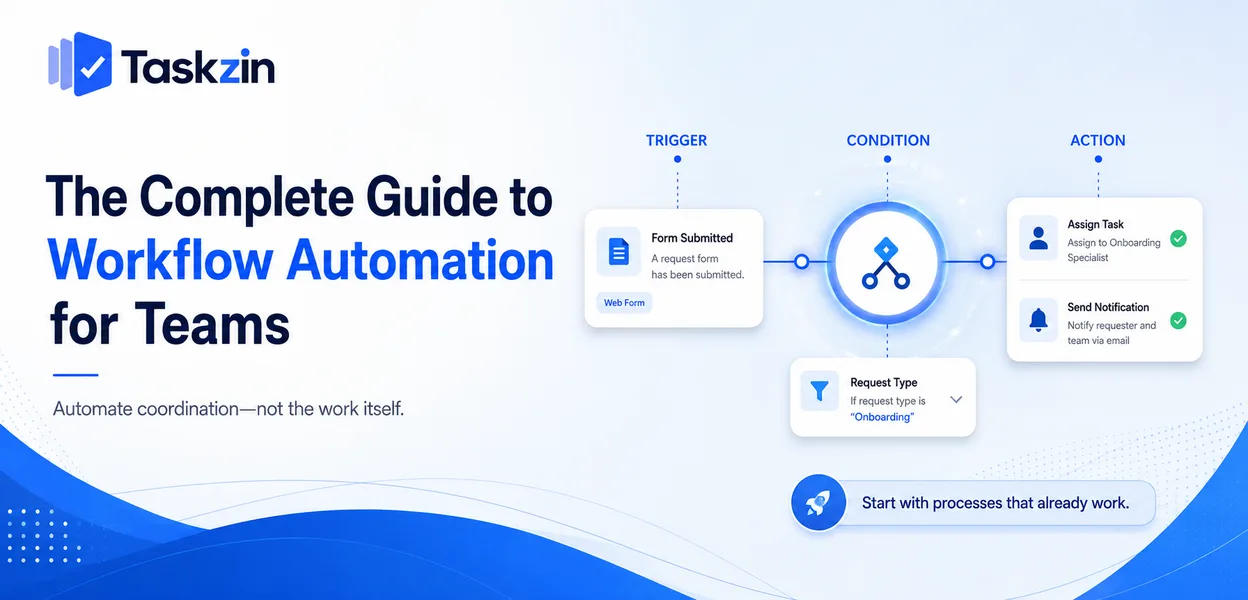
The principle underneath is simple. Automate the coordination around the work, not the work itself, and automate only processes that already function.
This guide covers how automation works, what to build first, how to design rules that survive, and how to govern them as they multiply.
Quick answer: Workflow automation replaces repetitive coordination steps with rules: when this happens, do that. The highest-return automations are almost never the impressive ones — they are intake forms, handoff assignments, exception notifications and recurring task creation. Most teams automate the wrong things first, which is why automation often adds complexity without saving time.
What Workflow Automation Actually Is
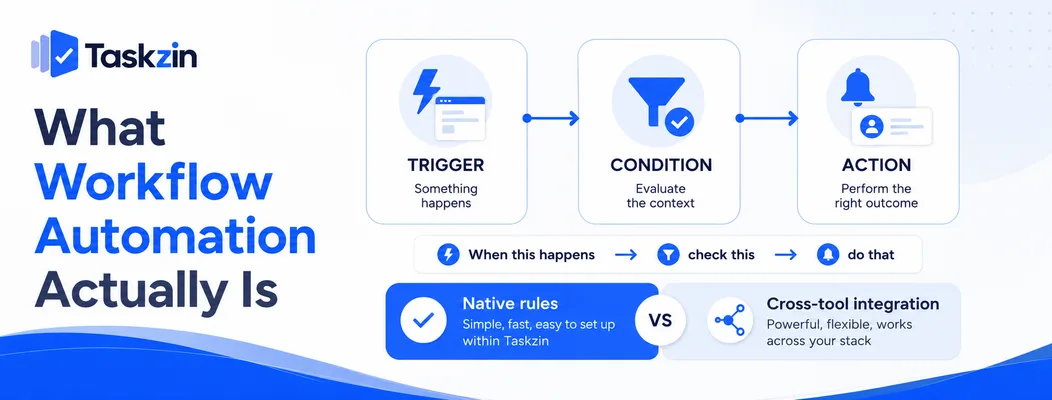
Every automation is a trigger, optional conditions, and one or more actions — and the important architectural choice is whether it runs inside one tool or between several.
Triggers, conditions and actions
The trigger is the event: a form submitted, a status changed, a date passed, a file uploaded.
Conditions filter it: only if the request type is design, only if the value exceeds a threshold.
Actions are what happens: assign, notify, create, update, move.
Almost every automation in every tool follows this shape. Understanding it makes vendor differences much easier to evaluate, because you are comparing which triggers and actions are available rather than comparing marketing language.
Native automation versus cross-tool integration
Native automation runs inside one product — when a task moves to review, assign it to the reviewer. Integration platforms like Zapier, Make and n8n connect separate products.
Native rules are included in your subscription, run reliably, are visible to anyone who opens the project, and fail loudly. Cross-tool automation is genuinely necessary when data must cross a boundary, and it carries a subscription, a maintenance burden and a silent-failure risk. Exhaust native options first — most tools now include rules on every plan, Taskzin among them.
What it is not
Automation is not AI, and it is not process improvement. It executes rules you write.
This matters because automation applied to a poorly designed process produces bad outcomes faster and more consistently, while making the underlying problem harder to see.
What to Automate, in Priority Order
Priority Automation Typical return Effort 1 Intake form creating a task Very high Low 2 Assignment on stage change High Low
3 Recurring task creation High Low 4 Exception notifications (overdue, blocked) High Low 5 Status change from real events Medium–high Medium 6 Escalation after a threshold Medium Low 7 Cross-tool sync Medium High 8 Report generation Medium Medium
Building Your First Automations
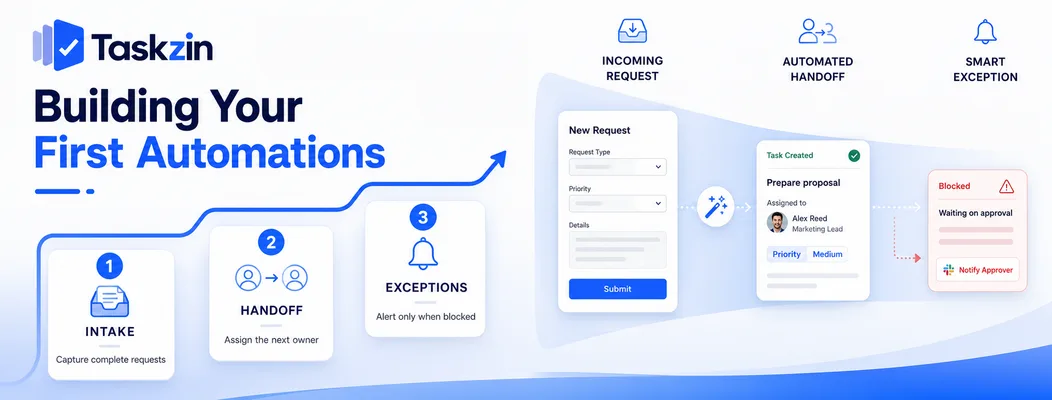
Start with intake, then automate the handoffs between people, and restrict notifications to exceptions rather than events.
Start with intake
A form that creates a task with required fields is the single highest-return automation available to most teams.
It solves three problems at once: requests stop arriving through five channels, the clarification round disappears because the requester cannot submit without specifying what they need, and total demand becomes visible for the first time. It takes an afternoon to build and changes how a team operates.
Automate the handoff, not the task
The time lost in most teams is not in doing work — it is in the gap between one person finishing and the next starting. Someone must notice, assign, and inform.
Automating that transition removes a delay that recurs on every single item. Automating the work itself is usually neither possible nor the bottleneck, which is why teams that start there see little benefit.
Notify on exceptions only
It is easy to automate notifications and hard to automate judgement about which matter. Teams routinely end up with a message for every status change, and people mute the channel within a week.
Notify when something is overdue, blocked, or has been waiting longer than usual. Routine progress does not need an announcement, and announcing it destroys the value of the notifications that do.
Designing Automations That Survive
Keep each rule simple enough to explain in one sentence, assign an owner, and decide in advance what happens when it fails.
Keep each rule simple enough to explain
If describing an automation requires a diagram, it will be impossible to debug when it misbehaves.
Prefer several simple rules over one elaborate chain. The maintenance cost of complexity is paid by whoever inherits it, which is frequently not the person who built it.
Give every automation an owner
Name a person responsible for each rule. Document what it does and why it exists.
Automations without owners accumulate until nobody knows what is running. The first symptom is usually someone asking why a task was assigned to them and nobody being able to answer.
Plan for failure, not just success
Ask what happens if the trigger fires when the data is unexpected — the assignee has left, the field is empty, the linked item was deleted.
Cross-tool automations especially need explicit failure handling and alerts. An automation that quietly stops working is worse than no automation, because the team has stopped doing the step manually and nobody has noticed.
Governing Automation as It Grows
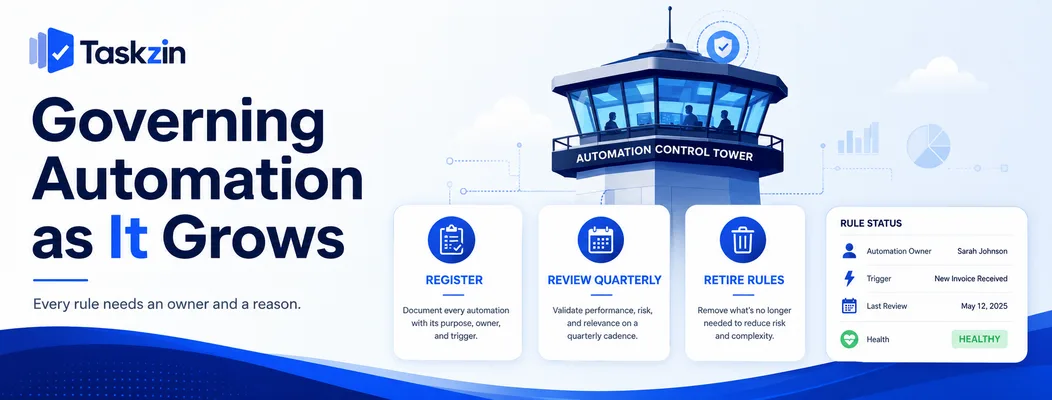
Keep a register of what is running, review it quarterly, and retire rules deliberately rather than leaving them to accumulate.
Maintain a register
A simple list: what the automation does, what triggers it, who owns it, why it exists.
This takes minutes to maintain and prevents the state most organisations reach after two years, where dozens of rules run and nobody can account for them. It also makes onboarding a new team member vastly easier.
Review quarterly
Once a quarter, check each automation: is it still firing, is it still needed, has the process changed underneath it?
Look particularly for rules built for a problem that no longer exists. These are the most common form of automation debt, and they are invisible unless someone looks.
Retire rules deliberately
When a process changes, retire the automations attached to it as part of the change rather than afterwards.
Orphaned rules produce confusing behaviour that is hard to trace, because nobody looking at the current process would expect them to exist.
Common Workflow Automation Mistakes
The three failures are automating a broken process, building chains nobody can debug, and allowing silent failure.
Automating a process that does not work
Automation makes a process faster and more consistent. If the process is wrong, you get wrong outcomes faster, and the automation hides the problem.
Run the process manually until it works, then automate it. The manual period is also how you discover which steps are genuinely necessary — usually fewer than you assumed.
Chains nobody can debug
One person builds a twelve-step scenario with branching logic. They leave. Something breaks, and nobody can work out what it was supposed to do.
This is the most common way automation becomes a liability rather than an asset.
Silent failure
The defining risk of cross-tool automation. A connection expires, an API changes, a quota is exhausted, and the rule stops running.
Nobody notices because the absence of an action is invisible. Enable failure notifications, and periodically verify that critical automations actually ran rather than assuming they did.
Frequently asked
What is workflow automation?
Rules that perform routine steps without manual work, structured as a trigger, optional conditions and actions — for example, when a form is submitted, create a task, assign it and notify the owner.
What should a team automate first?
Intake. A form that creates a task with required fields removes the largest source of coordination overhead, eliminates the clarification round, and makes total demand visible.
What is the difference between native automation and integration tools?
Native automation runs inside one product, is included in your subscription and fails visibly. Integration tools like Zapier or Make connect separate products, and carry cost, maintenance and silent-failure risk.
How do you stop automations breaking silently?
Assign an owner to each rule, enable failure notifications, keep a register of what is running, and periodically verify that critical automations actually fired rather than assuming they did.
Can you automate too much?
Yes. Automating judgement rather than administration, or building rules so complex nobody can debug them, creates more overhead than it removes. Each rule should justify itself against a specific problem.
Do you need technical skills to build automations?
Not for native rules in most project tools, which use plain-language recipe builders. Cross-tool platforms range from straightforward to genuinely technical depending on the complexity required.
How do you measure whether automation is working?
Time the process before and after, including any review time, and check whether the specific problem it addressed has reduced. Count how many rules are still firing at quarterly review.
Binita Ray is a content writer at Taskzin, creating insightful and practical content on task management, team collaboration, productivity, workflow optimization, and SaaS solutions. She focuses on helping businesses, teams, and professionals simplify their work processes, improve efficiency, and make better use of modern productivity tools.
All posts by Binita Ray

Comments