Taskzin vs Zoho Projects
An honest comparison of Taskzin and Zoho Projects, covering suite membership versus standalone focus, where Zoho's integration and built-in modules win, where Taskzin's unified views and guest access win, and what migration involves.

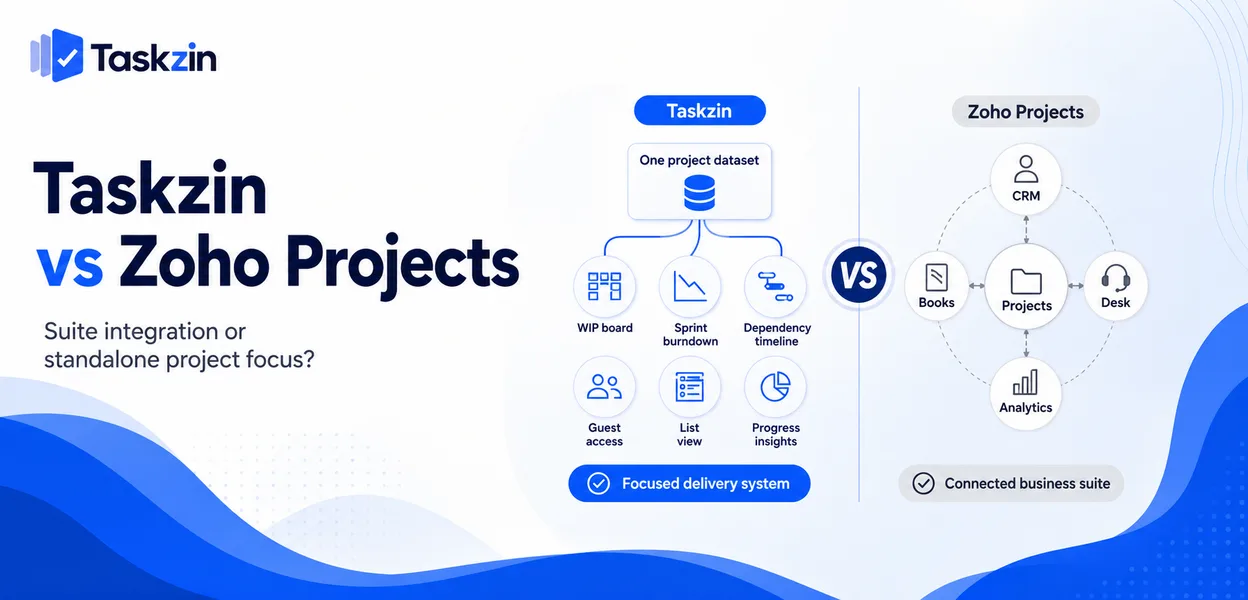
If you run Zoho CRM and Zoho Books, the integration argument is real and should probably decide it. If you are not in the suite, that advantage disappears and the comparison becomes a straight product question.
Quick answer: Zoho Projects is a competent project tool whose main advantage is being part of the wider Zoho suite — CRM, Books, Desk and the rest. Taskzin is a standalone project tool with six views over one dataset, flat per-member pricing and free unlimited guests. The decision is usually less about features than about whether you are already committed to Zoho.
The Real Decision
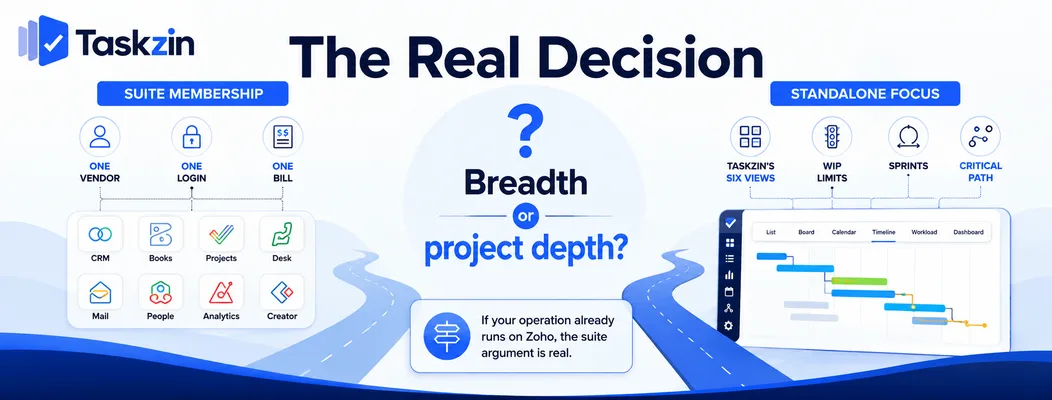
This comparison turns on whether suite membership is worth more to you than a tool focused on one job.
Suite membership versus standalone focus
Zoho's proposition is breadth: one vendor, one login, one bill, with data flowing between applications. Zoho Projects is a component of that.
Taskzin's proposition is focus: doing project and task management well, with integrations to whatever else you use — Slack, Gmail, Google Drive and Calendar, Outlook, GitHub, HubSpot, Salesforce, Zapier and Zoho among them.
What each optimises for
Zoho Projects optimises for fitting neatly beside other Zoho products. Its feature set is broad and its depth in any one area is moderate.
Taskzin optimises for the project work itself — six views over one dataset, board WIP limits and swimlanes, sprints with velocity and burndown, dependencies with critical path recalculation.
When the suite argument wins
If your CRM, accounting and support desk are all Zoho, adding a seventh vendor has real costs:
another subscription, another admin surface, another integration to maintain.
That argument is legitimate and frequently decisive. It is also worth testing rather than assuming — check what data actually flows between Zoho Projects and the rest of your suite in practice.
Taskzin vs Zoho Projects at a Glance
Where Zoho Projects Is Stronger
Positioning Standalone project tool Part of the Zoho suite
Views over one dataset
List, Board, Calendar, Gantt, Table, Timeline Tasks, Gantt, Kanban, calendar WIP limits and swimlanes Yes Limited
Sprints, velocity, burndown Starter and above Available Dependencies and critical path Yes, recalculates Yes Issue tracking Tasks with custom fields Built-in issue module Timesheets Time tracking on Business Built in Docs linked to tasks Yes Documents module Free plan Yes, up to 10 members Very limited Pricing Flat per member, no seat tiers Per user, tiered Guests Free, unlimited, view and comment Varies by plan Automations All plans Higher tiers Dashboards 30+ widgets on Business Available Data export JSON or CSV, any plan Available Suite integration Via integrations incl. Zoho Native across Zoho
Verify current Zoho Projects pricing and plan limits before relying on cost comparisons.
Where Taskzin Is Stronger
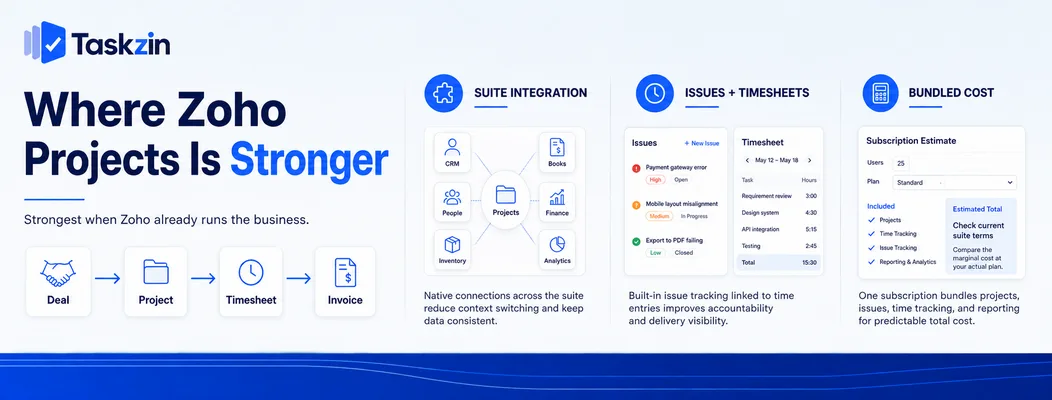
Zoho Projects wins on suite integration, on having issue tracking and timesheets built in, and on cost if you are already buying Zoho.
Integration across the Zoho suite
Native connection to Zoho CRM, Books, Desk and Analytics means data moves between applications without integration work.
For an organisation running its whole operation on Zoho, this genuinely reduces friction. A deal in CRM producing a project, time recorded against it flowing to invoicing — that chain works without middleware.
Built-in issue tracking and timesheets
Zoho Projects includes a distinct issue-tracking module and timesheets as core functionality rather than higher-tier additions.
Taskzin handles issues as tasks with custom fields, and time tracking with billable rates sits on the Business plan. If you need both at entry level, Zoho's packaging may suit better.
Cost inside a bundled subscription
Where Zoho Projects is included or heavily discounted within a suite subscription you already hold, the marginal cost argument is strong.
Run the comparison honestly: what does adding Zoho Projects cost against what Taskzin costs at your headcount, including guests.
Where Taskzin Is Stronger
Taskzin wins on unified views, on flow and sprint management, and on guest access and data portability.
Views over one dataset Six views — List, Board, Calendar, Gantt, Table, Timeline — all representing the same work, so a developer on a board and a client-facing lead on a timeline see the same reality without duplication.
This matters most for cross-functional teams. Switching view should not mean switching structure, and that is the design difference.
Flow management and sprints
Board WIP limits and swimlanes for Kanban teams, sprints with velocity and burndown on Starter and above, and critical path recalculation when dates change.
Zoho Projects supports sprints; the flow-control depth — enforced WIP limits in particular — is where Taskzin goes further.
Guest access and export
Taskzin includes unlimited free guests with view and comment access, and full JSON or CSV export on any plan including Free.
For client-facing teams the guest policy is frequently the largest cost difference. The export position matters differently — it is a portability guarantee, which is worth checking against any vendor before committing.
The Suite Trade-Off Examined
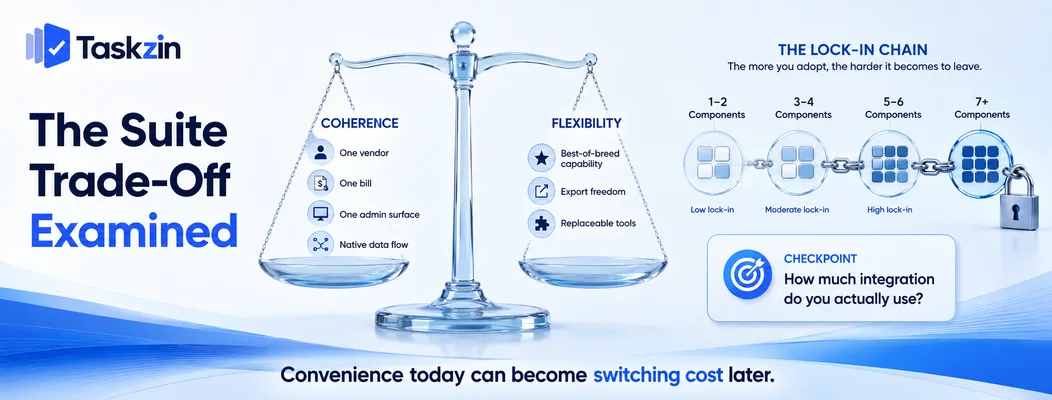
Suite integration saves real integration work and costs flexibility; the honest question is how much of the integration you actually use.
What integration genuinely saves
One vendor relationship, one bill, one administration surface, and data flowing without connectors you have to maintain.
For a small operations team with no technical resource, that is meaningful. Maintaining four integrations between best-of-breed tools is real ongoing work.
What it costs in flexibility
Suite components are rarely the best available in their category, because breadth and depth compete for the same development effort.
You accept moderate capability in each area in exchange for coherence. Whether that is a good trade depends on whether project management is central to your operation or peripheral to it.
The lock-in question
The more suite components you adopt, the more expensive leaving any one becomes.
Check export before you commit, in either direction. Taskzin exports fully to JSON or CSV on any plan; verify what Zoho Projects exports and in what format, because that is the thing you will care about in three years and cannot fix retrospectively.
Migrating Between Them
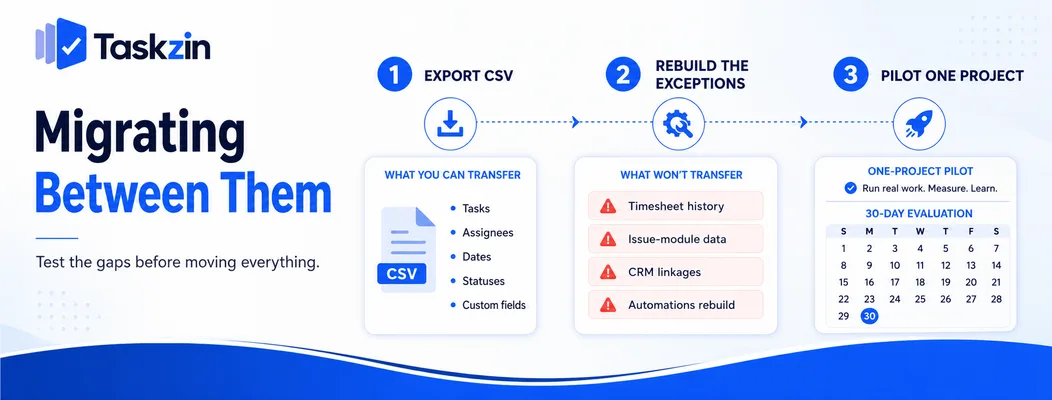
Zoho Projects is not covered by the one-click importer, so migration is CSV, and some modules have no direct equivalent.
What transfers
Tasks, assignees, dates, statuses and custom fields map reasonably through CSV import.
Taskzin's one-click importer covers ClickUp, Jira, Asana and Trello — Zoho Projects is not among them, so plan for a CSV exercise rather than a one-hour migration.
What needs rebuilding
Timesheet history, issue-module data and anything relying on Zoho CRM linkage need separate handling.
Automations rebuild rather than transfer, which is normal for any migration and is worth treating as an opportunity to remove rules you no longer need.
Pilot before committing
Move one project or one team, run it for a month, and confirm the gaps are acceptable before moving everything.
This is standard practice for any migration and matters more here because the suite linkage is easy to underestimate until it is gone.
Frequently asked
Is Zoho Projects good?
It is a competent project tool with broad functionality and moderate depth. Its main advantage is native integration with the rest of the Zoho suite rather than being best-in-class at any one thing.
Which is better, Taskzin or Zoho Projects?
Zoho Projects if you already run the Zoho suite and value the integration. Taskzin if you want unified views, stronger flow management and free unlimited guests, and are not committed to Zoho.
Which is cheaper?
Taskzin is free up to 10 members and then flat per member with no seat tiers, with free guests. Zoho Projects may be cheaper inside an existing suite subscription — compare at your actual headcount including collaborators.
Do you need the whole Zoho suite?
No, Zoho Projects can be used standalone. But the integration advantage is the main reason to choose it, so using it alone removes most of its distinguishing benefit.
Can you import Zoho Projects data into Taskzin?
Via CSV rather than the one-click importer, which covers ClickUp, Jira, Asana and Trello. Tasks, dates and custom fields transfer; timesheet and issue-module history need separate handling.
Does Zoho Projects have sprints?
Yes, it supports agile sprint working. Taskzin's difference is in flow control — enforced WIP limits and swimlanes on the board — rather than in whether sprints exist.
Which suits a team already using Zoho CRM?
Zoho Projects has a genuine advantage there, since deal-to-project and time-to-invoice flows work natively. Test how much of that chain you would actually use before deciding on it.
Sanju Shrestha is a SaaS content writer at Taskzin who explores smarter ways to manage work, organize priorities, and improve team performance. Her content covers productivity strategies, digital workflows, collaboration, and task management, with a focus on helping modern teams work more efficiently and stay aligned.
All posts by Sanju Shrestha

Comments