Weekly To-Do List Template for Teams
A weekly to-do list template for teams with a worked example, covering why team lists fail differently from personal ones, the weekly cycle that keeps them current, how to make commitments realistic, and common mistakes.


A weekly team list works when three things are true: every item has one named owner, the number of commitments matches the hours actually available, and carry-over is discussed rather than silently rolled forward. Team lists fail differently from personal lists — the failure is not forgetting things, it is that nobody can see the total.
The template below is deliberately light. It suits teams that do not run sprints but want more structure than a chat message on Monday morning.
Why Team Lists Fail Differently

The problem with team lists is not memory, it is visibility and trust.
Individual lists do not aggregate
Five people each with an excellent personal list still have no shared view. Nobody knows what anyone else committed to, whether two people are duplicating work, or whether one person is carrying three times the load.
Personal productivity does not sum to team coordination. That gap is what a shared weekly list exists to close.
Nobody sees the total
Individual overcommitment is invisible until it fails. A person who took on twelve items looks the same on Monday as one who took four.
A shared list makes total load visible before the week starts, which is the only point at which it can be adjusted.
The list nobody trusts
The most common failure: a shared list that is out of date by Wednesday. People check it once, find it wrong, and stop.
Trust is binary. A list updated inconsistently is worse than no list, because people act on stale information rather than asking.
The Weekly Team List Template
Six columns, no more.
Column Purpose Notes Item What is being done Concrete action, not a topic Owner One named person Never a team or "everyone" Priority Must / should / could this week Forces a real ranking Estimate Rough hours or half-days Enough to check totals Status Not started / in progress / blocked / done Updated by the owner
Blocked by Who or what, since when Blank unless blocked
Weekly context to record above the list: what the team is trying to achieve this week, in one sentence.
A Filled Example
A five-person team's week, showing what the list reveals at a glance.
Item Owner Priority Est. Status Blocked by Ship payment retry fix to production S. Thapa Must 1.5d In progress — Onboarding email sequence — final draft A. Rai Must 1d Done — Q4 pricing analysis for leadership P. Karki Must 2d Blocked Finance data, since Mon Fix dashboard loading on mobile S. Thapa Should 0.5d Not started — Interview two candidates A. Rai Must 0.5d Done — Customer research calls (3) M. Gurung Should 1d In progress — Update help centre after retry fix M. Gurung Should 0.5d Not started Waiting on payment fix Vendor contract review P. Karki Could 0.5d Not started —
What the list shows without anyone asking: P. Karki has been blocked since Monday and nobody has escalated it, and the help centre update depends on work that has not shipped.
The Weekly Cycle

Close honestly on Friday, commit realistically on Monday, and check for stuck items once midweek.
Friday: close the week honestly
Fifteen minutes. Mark what is done, and for anything not done, say why — not started, underestimated, blocked, or displaced by something urgent.
That reason is the useful part. A team where half the week is consistently displaced by unplanned work has a planning problem that only shows up if the reasons are recorded.
Monday: commit, do not wish
Twenty minutes. Each person states what they will complete this week, with rough estimates, and the lead checks the totals against available hours.
The word is commit. A list of things people hope to get to is a wish list, and wish lists do not create the accountability that makes shared lists useful.
Midweek: one look at what is stuck
Wednesday, five minutes, one question: is anything blocked that nobody has escalated?
This single check catches the pattern where someone is stuck on Monday and still stuck on Friday because raising it felt like complaining. Where the list shows blocked items with a duration attached, this becomes visible rather than requiring a meeting.
Making Commitments Realistic
Count real available hours, limit priorities to three per person, and treat carry-over as information.
Count the hours you actually have
Five people times five days is twenty-five person-days on paper. After meetings, support duty, interviews and interruptions, it is usually fifteen to eighteen.
Plan against the real number. Teams that plan against the nominal figure carry over every week and conclude that planning does not work.
Three priorities per person, not ten
Three "must" items per person per week. Everything else is "should" or "could".
Ten priorities means no priorities. The constraint forces the conversation about what actually matters, which is the entire benefit of planning weekly rather than just working.
Carry-over is data, not failure
Something carrying over is normal. Something carrying over three weeks running is a signal — usually that it is bigger than estimated, genuinely blocked, or that nobody actually intends to do it.
Ask which. All three are fine answers; leaving it silently rolling forward is not.
Common Weekly List Mistakes
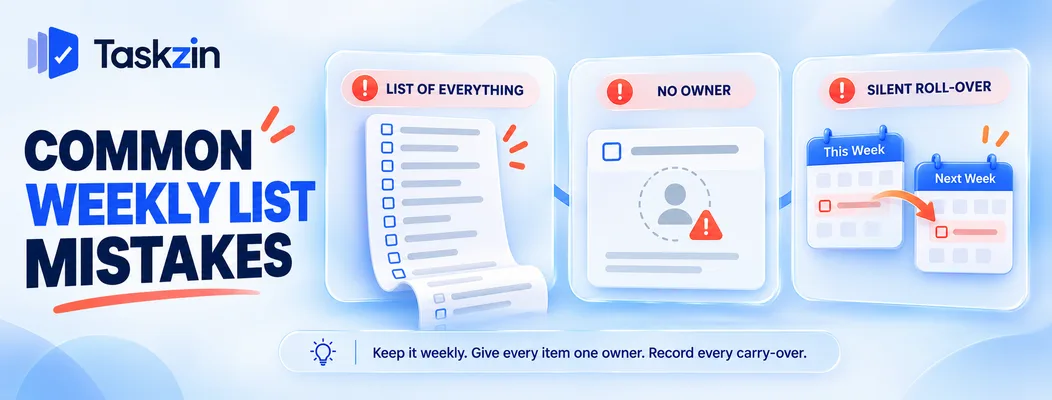
Three failures: a permanent list of everything, unowned items, and silent roll-over.
A list of everything, forever
A weekly list that accumulates every task the team might ever do stops being a weekly list and becomes a backlog with dates attached.
Keep it to this week. The backlog is a separate thing, and pulling from it on Monday is what makes the weekly list meaningful.
No owner, or a team as owner
"Marketing to review the copy" is unowned. When Friday arrives, nobody did it and nobody is responsible.
One name per item, always. If two people genuinely share it, split it into two items.
Rolling items over silently
Dragging unfinished items into next week without comment is how a weekly list becomes meaningless.
Every carry-over gets a one-word reason. It takes seconds and it is the difference between a planning practice and a ritual.
Frequently asked
What should a weekly team to-do list include?
The item, one named owner, a must/should/could priority, a rough estimate, status, and what is blocking it if anything. Plus one sentence on what the team is trying to achieve that week.
How many tasks should someone commit to per week?
Three "must" items, with additional lower-priority work. More than three priorities means nothing has been prioritised.
Is a weekly list the same as a sprint?
No. A sprint has a goal, a formal commitment, estimation and a review cycle. A weekly list is lighter — suitable for teams that want coordination without agile ceremony.
What do you do with items that carry over?
Record a one-word reason each time. Anything carrying over three weeks running is either bigger than estimated, genuinely blocked, or not actually intended — ask which.
Should the list be shared with everyone?
Within the team, yes — the visibility of total load is the main benefit. Sharing beyond the team turns it into a status report and changes how people write it.
How do you handle work that arrives midweek?
Add it and record what it displaced. The displacement is the data — a team losing half its week to unplanned work every week has a capacity problem that only becomes visible if it is tracked.
Who owns the weekly list?
The team lead runs the Monday and Friday sessions, but each item is owned by the person doing it. The lead's job is checking totals against real capacity, not assigning work.
Binita Ray is a content writer at Taskzin, creating insightful and practical content on task management, team collaboration, productivity, workflow optimization, and SaaS solutions. She focuses on helping businesses, teams, and professionals simplify their work processes, improve efficiency, and make better use of modern productivity tools.
All posts by Binita Ray


Comments